# Configure trade-model cache fields
In this tutorial we will look at configuring and using cache fields with a simplified trade model. In Trading Integration Adapter blades, the _trademodels.xml_ file located in _Blade/DataSource/etc_ specifies the various states and transitions that govern the lifecycle of a trade.
## Overview
On receiving a client side [TradeEvent,opts="nofollow"](https://docs.caplin.com/developer/api/cis/6/com/caplin/trading/TradeEvent.html), a trade is promoted to another state and the `TradeEvent` is then forwarded to a registered [TradeListener,opts="nofollow"](https://docs.caplin.com/developer/api/cis/6/com/caplin/trading/TradeListener.html) (the generated <tradeModel name>TradeListenerAdapter), here the type is parsed and the event is sent out to the appropriate method on the < tradeModel name >TradeListener. In the implementation of this < tradeModel name >TradeListener, the trade can be obtained from the event and its cached fields' values can be extracted from the `TradeEvent` to be put onto the desired new <trigger>TradeEvent to be sent in response.
## Example
So here’s an example using the following simplified trade model:
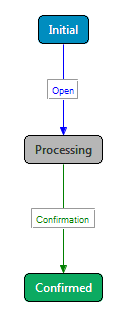
```xml
```
```java
public class SimpleBackend implements ESPTradeListener
{
…
@Override
public void onOpen(OpenTradeEvent event )
{
ProcessingResponder responder = trade.getProcessingResponder();
ConfirmationTradeEvent confirmationEvent = new ConfirmationTradeEvent(trade);
// Copy all cached fields to outgoing message
for (Map.Entry field :trade.getFields().entrySet())
{
confirmationEvent.addField(field.getKey(), field.getValue());
}
// Set transition specific fields
confirmationEvent.setConfirmationID(String.valueOf(nextConfirmationID++));
confirmationEvent.setConfirmationTime(String.valueOf(System.currentTimeMillis()));
// Send the confirmation
try
{
responder.sendConfirmationEvent(confirmationEvent);
}
catch (TradeException e)
{
e.printStackTrace();
}
}
…
}
```
The `OpenTradeEvent` with which the `onOpen` method is called, in the `ESPTradeListener` implementation (above), will contain a trade with only the `RequestId` and `TradeDetails` cached. Therefore only those two fields will be transferred to the `ConfirmationEvent` by the for loop and `TradeTime` will not be accessible.
## CacheField Options
When no `cacheFields` tag is present, all fields will be cached as before. If no `cacheField` tags are present within cacheFields, no fields will be cached. Each cacheField tag must have the attributes `name` and `where`:
```xml
```
The attribute `where` can have one of three values:
* server
* client
* both