# DataSource configuration syntax
This page describes the configuration syntax used by C DataSource API applications from version 5 and Java DataSource API applications from version 6.
Earlier DataSource API versions used an [XML configuration format](../6/datasource/datasource-xml-config.md) that was deprecated in the DataSource 6 APIs and removed in the DataSource 7 APIs.
## Introduction
DataSource applications can be configured by settings stored in one or more configuration files, or by settings stored in a database and supplied to the DataSource application by a configuration script.
This document describes:
* The syntax of the different types of configuration item used to configure a DataSource application.
* How variables, conditionals, and macros can be used in a configuration file.
* How configuration settings supplied by a web server or configuration script can be used to configure a DataSource application.
For a description of the configuration items that you can use to configure a particular DataSource application (such as Caplin Liberator, Caplin Transformer, or an Integration Adapter), refer to the Administration Guide for the application that you want to configure.
For a description of the DataSource communications infrastructure and how it links Caplin components together, see [Caplin Platform > DataSource](index.md).
## Types of configuration item
Four different types of configuration item can be used to configure a DataSource application:
* [Boolean configuration items](#boolean-configuration-items)
* [Single-parameter configuration items](#single-parameter-configuration-items)
* [Multiple-parameter configuration items](#multiple-parameter-configuration-items)
* [Configuration items with nested options](#configuration-items-with-nested-options)
Some of these configuration items allow you to specify a list of one or more values (see [Lists](#lists)).
### Boolean configuration items
A boolean configuration item does not take any value, but is set to true if present in the DataSource configuration, and to false (the default) if omitted from the configuration.
An example of a boolean configuration item is [`latency-chain-enable`](datasource-latency-chains-configuration.md#latency-chain-enable), which enables or disables latency chaining.
**Example (C DataSource API)**
```
*latency-chain-enable*
```
**Example (Java DataSource API)**
```
*latency-chain-enable* TRUE
```
### Single-parameter configuration items
Single parameter configuration items take one parameter:
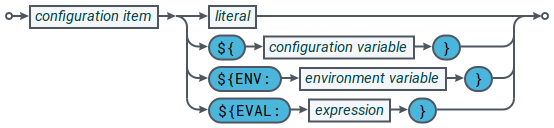
The parameter can be assigned a [literal](#literals), a [configuration variable](#configuration-variables), an [environment variable](#environment-variables), or an [expression](#expressions).
An example of this type of configuration item is [`datasrc-port`](datasource-datasource-peers-configuration-part-2.md#datasrc-port), which specifies the network port that the application listens on for DataSource messages and connection requests.
```
*datasrc-port* 22001
```
In this case the listening port is set to `22001`.
If present in the configuration file, a single value configuration item must define the value to be assigned. If not present in the configuration file, the configuration item is assigned a default value.
### Multiple-parameter configuration items
Multiple-parameter configuration items take two or more parameters:
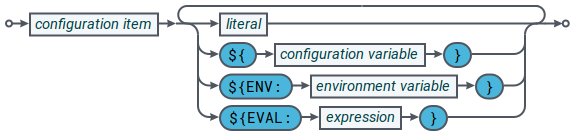
Each parameter can be assigned a [literal](#literals), a [configuration variable](#configuration-variables), an [environment variable](#environment-variables), or an [expression](#expressions).
An example of this type of configuration item is [`add-field`](datasource-field-definition-format.md#add-field), which maps a field name (a string) to a field number (an integer):
```
*add-field* Bid 22
```
In this case the Bid field is mapped to field number `22`.
If a multiple-parameter configuration item is present in the configuration file, values must be defined for all parameters that are not optional (such as the field name and field number in the example above).
If a parameter is described as optional, the value for that related item can be omitted from the configuration. The parameter will be assigned its default value.
Values are assigned to parameters according to the position of the value in the list of ordered arguments.
If the configuration item is not present in the configuration file, related items are assigned default values.
### Configuration items with nested options
This type of configuration item takes nested options, where each nested option can be any one of the four types of configuration item (boolean, single parameter, multiple parameter, and nested).
An example of this type of configuration item is [`add-peer`](datasource-datasource-peers-configuration-part-1.md#add-peer), which specifies options for connecting to a remote DataSource application (see [Data services](datasource-data-services.md)).
```
*add-peer*
*addr* liberator.example.com
*port* 25000
*end-peer*
```
In this case the address of the remote DataSource is set to `liberator.example.com`, and the port that it listens on to `25000`.
### Lists
Some configuration items and options allow you to specify a list of one or more values, where each value is the same type.
An example is [`addr`](datasource-datasource-peers-configuration-part-1.md#addr), a nested option of `add-peer`, which defines a list of addresses that the DataSource application will attempt to connect to:
```
*addr* 192.168.1.1 192.168.1.2 192.168.1.3
```
In the reference sections of the DataSource documentation, the syntax definition specifies the types that can be listed, as shown in the following table.
| List Type | Description | Example |
| --- | --- | --- |
| string list | A space separated list (array) of one or more strings. | A space separated list of IP addresses: `127.0.0.0 192.255.129.1` |
| integer list | A space separated list (array) of one or more integers. | A space separated list of port numbers: `22001 22002` |
## Literals
Literal values in a configuration file can be numbers or strings.
If a literal value contains one or more spaces, it must be enclosed in single or double quotes. To escape a quote character in a literal value, precede it with a backslash (`\`).
Examples:
**Setting the application name to the literal 'TradingAdapter' (no quotes required)**
```
*application-name* TradingAdapter
```
**Setting the application name to the literal 'Trading Adapter' (quotes required)**
```
*application-name* [green]##"Trading Adapter"##
```
## Configuration variables
This section covers defining, undefining, and referencing custom variables in configuration files.
### Defining a variable
You define a configuration variable using the `define` configuration directive:
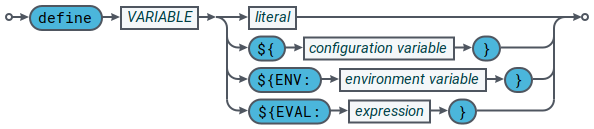
You can set a configuration variable to a [literal](#literals), a [configuration variable](#configuration-variables), an [environment variable](#environment-variables), or an [expression](#expressions).
By convention, variable names in Caplin configuration files are in upper case.
The scope of the variable is the configuration file in which it is defined, and any files that include this configuration file using the `include-file` directive (see [Including multiple configuration files](#including-multiple-configuration-files)).
For example, to define the variable `HTTP_PORT` with the value `8080`, use the configuration below:
```
*define* HTTP_PORT 8080
```
### Undefining a variable
You undefine a configuration variable using the `undefine` configuration directive:

For example, to undefine the variable `HTTP_PORT`, use the configuration below:
```
*undefine* HTTP_PORT
```
### Referencing a variable
The following notation shows how a variable is used to set the value of a configuration item.

When a variable is used to set the value of a configuration item, the name of the variable must be enclosed in curly braces and preceded by the `$` character. If an undefined variable is used in the configuration, the value of the configuration item is set to an empty string and a warning is logged to the console and log file.
The following example defines a variable, and sets the value of a configuration item using that variable.
**Example: defining and using a variable**
```
*define* HTTP_PORT 8080
*http-port* [blue]##${HTTP_PORT}##
```
In this case, the value of Liberator’s [`http-port`](../liberator/liberator-http-configuration-part-1.md#http-port) configuration item is set to `8080` (using the `HTTP_PORT` variable).
Variables can also be concatenated with surrounding text and other variables.
**Example: concatenating a variable with surrounding text**
```
*define* HTTP_PORT 8080
*http-port* 1[blue]##${HTTP_PORT}##
```
In this case, the value of Liberator’s [`http-port`](../liberator/liberator-http-configuration-part-1.md#http-port) configuration item is set to `18080`.
### Predefined variables
The following variables are predefined by DataSource libraries:
**C DataSource API and .NET DataSource API predefined variables**
| Variable | Description |
| --- | --- |
| APP_NAME | The name of the DataSource application, as defined by `application-name`. |
| ccd | Current configuration directory. The full path to the directory containing the configuration file. |
| HOME_DIR | The home directory of the process owner. |
| HOST_NAME | The name of the host machine |
| MAJOR_VERSION | The major version of the DataSource library (for example, `7`) |
| MINOR_VERSION | The minor version of the DataSource library (for example, `0`) |
| OS | The name of the operating system that the DataSource library was built for. Examples are `win64` and `linux-EL6-gnu`. |
| OS_TRIPLET | The GNU configuration triplet (of the form __cpu__-__manufacturer__-__operating_system__). Examples are `x86_64-pc-win64` and `x86_64-pc-linux-EL6-gnu`. |
**Java DataSource API predefined variables**
| Variable | Description |
| --- | --- |
| application | The name of the DataSource application, as defined by `application-name`. |
| ccd | Current configuration directory. The full path to the directory containing the configuration file. |
| CPU | The architecture of the Java virtual machine: `x86` or `x86_64` |
| host | The name of the host machine, as returned by [`java.net.InetAddress.getLocalHost().getHostName()`](https://docs.oracle.com/javase/8/docs/api/?java/net/InetAddress.html) |
| os | The name of the host operating system: `linux-gnu`, `win32`, `win64`, or `darwin` |
## Environment variables
This section describes how to reference an environment variable in a DataSource configuration file.
Environment variables are referenced using the syntax below:

The name of the environment variable must be preceded by the text `ENV:` and enclosed in curly braces, and the braces must be preceded by the `$` character.
Environment variables that contain spaces are interpolated as a single value, not multiple values. As such, this syntax is not suitable for use with configuration items that accept multiple, space-separated values. For example, given a shell environment variable of `USERS` that is set to `Alice Bob`, the configuration setting `rttp-log-users ${ENV:USERS}` would be interpolated as `rttp-log-users "Alice Bob"`, not `rttp-log-users "Alice" "Bob"` as [`rttp-log-users`](../liberator/liberator-session-configuration.md#rttp-log-users) expects.
If the environment variable has not been defined, the syntax returns an empty string and a warning is logged to the console and log file.
The following example sets the [runtime-user](datasource-run-time-environment-configuration.md#runtime-user) configuration item to the value of the `USER` environment variable:
```
*runtime-user* [blue]##${ENV:USER}##
```
## Expressions
This section describes how to use evaluated expressions in a configuration file. Expressions enable you to set a configuration item to a calculated value.
The expression macro uses the syntax below:

Each value in the expression can be a [literal](#literals), a [configuration variable](#configuration-variables), an [environment variable](#environment-variables), or a [single-parameter configuration item](#single-parameter-configuration-items).
All operators work with numeric operands, but the addition operator (+) is the only operator that works with string operands. If the subtraction (-), division (/), and multiplication (*) operators are used with a string operand, the DataSource raises an error.
When the addition operator (+) is used with string operands it concatenates the strings. If the addition operator is used with a numeric operand and a string operand, then the numeric operand is implicitly converted to a string.
Operators observe the rules of precedence described in the table below. You can use parentheses to group parts of an expression (not shown in the syntax diagram above).
**Supported operators (in order of precedence)**
| Operators | Description |
| --- | --- |
| ( ) | Parentheses (grouping) |
| * / | Multiplication and division |
| + - | Addition and subtraction |
### Examples
The example below sets [`http-port`](../liberator/liberator-http-configuration-part-1.md#http-port) to the sum of the `PORT_BASE` variable and `80` (`=20080`):
```
*define* PORT_BASE 20000
*http-port* [blue]##${EVAL:${PORT_BASE} + 80}##
```
The example below sets [https-port](../liberator/liberator-https-configuration.md#https-port) to the sum of the [`http-port`](../liberator/liberator-http-configuration-part-1.md#http-port) configuration item and `1` (`=8081`):
```
*http-port* 8080
*https-port* [blue]##${EVAL:@http-port + 1}##
```
## Conditional flow control
DataSource libraries support conditional flow control constructions that have
`if/else/elseif/endif` statements in the DataSource configuration.
The `if` statement uses the syntax below:
```
if __conditional__
...
elseif __conditional__ ①
...
else ②
...
endif
```
1. Optional (`0..__n__`)
2. Optional (`0..1`)
Each conditional in an `if` statement can have a [simple](#simple-conditionals) or [complex](#complex-conditionals) form.
### Simple conditionals
A simple conditional runs an application-defined test against a value.
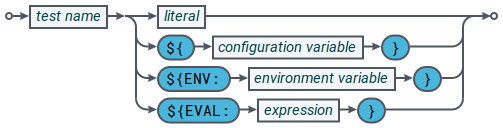
The value to be tested can be a [literal](#literals), a [configuration variable](#configuration-variables), an [environment variable](#environment-variables), or an [expression](#expressions).
DataSource applications support three tests by default:
**C DataSource API simple conditional tests**
| Test | Description |
| --- | --- |
| application | Returns TRUE if the test-value is equal to the value of the `application-name` configuration item. |
| hostname | Returns TRUE if the test-value is equal to the hostname. |
| os | Returns TRUE if the test-value is equal to the name of the operating system the application was compiled for. The test supports the following operating system names: `linux-EL6-gnu`, `linux-EL7-gnu`, `win32`, `win64`, `darwin`. |
**Java DataSource API simple conditional tests**
| Test | Description |
| --- | --- |
| application | Returns TRUE if the test-value is equal to the value of the `application-name` configuration item. |
| host | Returns TRUE if the test-value is equal to the hostname as returned by the method [`java.net.InetAddress.getLocalHost().getHostName()`](https://docs.oracle.com/javase/8/docs/api/?java/net/InetAddress.html) |
| os | Returns TRUE if the test-value is equal to the name of the host operating system. The test supports the following operating system names: `linux-gnu`, `win32`, `win64`, `darwin`. |
Additional simple conditional tests can be added to a DataSource application using the `ds_config_set_test()` function in the C DataSource API’s [Configuration API](https://docs.caplin.com/developer/api/datasource_c/latest/group__config.html). Currently no Caplin DataSource applications do so.
#### Example simple conditional
In the example below, the C DataSource configuration item [`jvm-location`](datasource-java-jvm-configuration.md#jvm-location) is set to a Windows path on a Windows host and to a Linux path on a Linux host:
**Example of a simple conditional statement for a C DataSource application**
```
if os win64
__[gray]### Microsoft Windows with Oracle Java 1.8.0##__
*jvm-location* "C:\Program Files\Java\jre1.8.0_131\bin\server\jvm.dll"
elseif os linux-EL6-gnu
__[gray]### Red Hat Enterprise Linux 6 with Oracle Java 1.8.0##__
*jvm-location* "/usr/java/jdk1.8.0_131/jre/lib/amd64/server/libjvm.so"
endif
```
- 📌 NOTE
-
The [Caplin Deployment Framework](../deployment-framework/index.md) automatically sets a `JVM_LOCATION` variable based on the `JAVA_HOME` environment variable or a set of default values if the `JAVA_HOME` environment variable is not set. This allows you to set [`jvm_location`](datasource-java-jvm-configuration.md#jvm-location) with just one line of configuration:
```
*jvm-location* [blue]##${JVM_LOCATION}##
```
### Complex conditionals
A complex conditional consists of a single value or an expression that evaluates to a boolean value.
The syntax for a complex conditional is illustrated below:
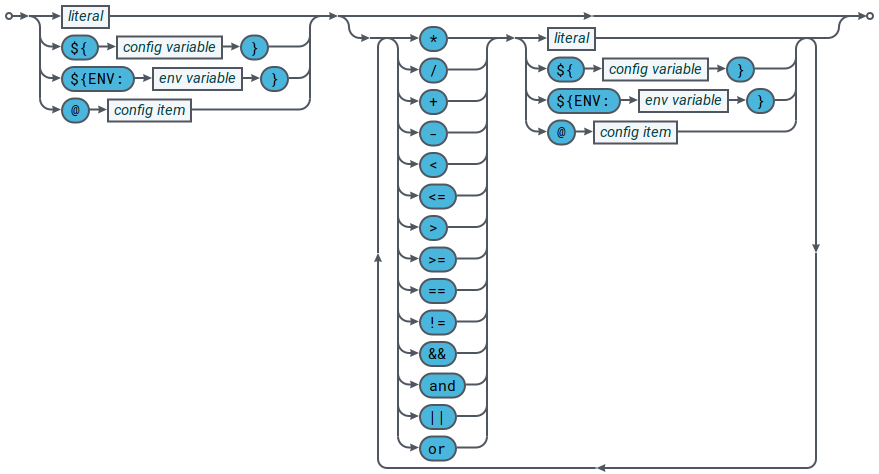
When writing a complex conditional with more than two operators, you can use parenthesis to control operator precedence (not shown in the syntax diagram above).
The following operators can be used inside a complex conditional:
**Supported operators (in order of precedence)**
| Operators | Description |
| --- | --- |
| ( ) | Parenthesis (grouping) |
| * / | Multiplication and division |
| + - | Addition and subtraction |
| < \<= > >= | Comparisons: less than, less than or equal to, more than, more than or equal to. |
| == != | Comparisons: equal to, not equal to |
| && and | Logical AND (`&&` or `and` can be used). |
| || or | Logical OR (`||` or `or` can be used). |
If a complex conditional does not evaluate to a boolean value, the result is automatically converted to a boolean according to the rules below:
**Automatic type conversion to boolean**
| Type | Value | Examples | Effective boolean value |
| --- | --- | --- | --- |
| Numeric | > 0 | 10, "10" | TRUE |
| Numeric | < 0 | -10, "-10" | TRUE |
| Numeric | 0 | 0, "0" | FALSE |
| String | Empty | "" | FALSE |
| String | Not empty | "example.com" | FALSE |
#### Example complex conditionals
In the example below, `https-port` is set to `443` if the boolean configuration item `https-enable` has the value `true`:
```
if [blue]##@https-enable##
*https-port* 443
endif
```
In the example below, `https-port` is set to `443` if the configuration item `http-port` is set to the standard HTTP port of 80:
```
if [blue]##@http-port## == 80
*https-port* 443
endif
```
In the example below, `https-enable` is set to true and `https-port` is set to `443` if the configuration variable `HTTPS` has the value `1` and the configuration variable `HOST_NAME` has the value `host1` or `host2`:
```
if [blue]##${HTTPS}## == 1 and ([blue]##${HOST_NAME}## == host1 or [blue]##${HOST_NAME}## == host2)
*https-enable*
*https-port* 443
endif
```
## Including multiple configuration files
The `include-file` directive specifies that another configuration file has configuration settings for the DataSource application. The `*` wild card can be used in the relative path of the included file to include multiple configuration files.
The example `include-file` directive below includes all files with a `.conf` extension in the `FX` directory:
```
*include-file* FX/*.conf
```
Relative file paths are searched for on the configuration include path. To add a path to the configuration include path, use `include-dir`:
**Add the directory of the configuration file to the configuration include path**
```
*include-dir* "[blue]#${ccd}#"
```
## Obtaining configuration from a webserver
The configuration for a DataSource application can be obtained from a web server by specifying the URL of the required configuration file in an `include-file` directive.
In the example below, a configuration file is downloaded from URL http://configurationserver/rttpd.conf:
```
*include-file* http://configurationserver/rttpd.conf
```
Only the HTTP protocol is supported.
By default, the file is retrieved using the `wget` command, which must be installed on the DataSource host. To use a different command to `wget`, see [Changing the download command](#changing-the-download-command) below.
### Changing the download command
The default command used to download configuration files from webservers is `wget -nv -O -`. To use a different download command, specify a new value for the `http-download-command` configuration directive.
You can use any download utility that accepts the URL to download as its first parameter and writes the downloaded resource to STDOUT.
When specifying the name of the command to `http-download-command`, include any options required to suppress other output to STDOUT, such as progress indicators, error messages, and status codes.
For example, to set `curl` as the download utility, use the configuration below:
```
*http-download-command* "curl -s"
```
Note that curl’s silent option (`-s`) has been specified, which stops curl from writing progress and error messages to STDOUT.