# Set up server failover capability
Here’s how to use the Deployment Framework to configure server failover in your Caplin Platform installation. This covers failover of [Liberator](../liberator/index.md), [Transformer](../transformer/index.md) and [Integration Adapters](../platform-architecture/putting-data-into-the-platform.md).
- 💡 TIP
-
In the following steps you’ll be using the `dfw` command of the Deployment Framework. Before entering any `dfw` command as `./dfw `, make sure your current (working) directory is set to the Deployment Framework’s topmost directory.
For a list of `dfw` commands, [click here](cdf-the-deployment-framework-command-utility-dfw.md).
## About failover legs
In the Caplin Platform, failover of server components is achieved by arranging them in processing units called "failover legs".
In normal operation, all the components in a single failover leg – typically Caplin Liberator, Caplin Transformer, Integration Adapters, and the Bank’s internal systems – work together to provide the system’s functionality. If a component fails (or a connection to it, or the machine on which it runs), the operations provided by that component are taken up by an alternative copy of the component running in a different failover leg.
The Caplin Platform Deployment Framework provides configuration that allows failover components to be deployed to the Framework. It has built-in support for failover configurations that use a primary failover leg and a secondary failover leg.
This diagram shows a Platform deployment with a primary and secondary failover leg:
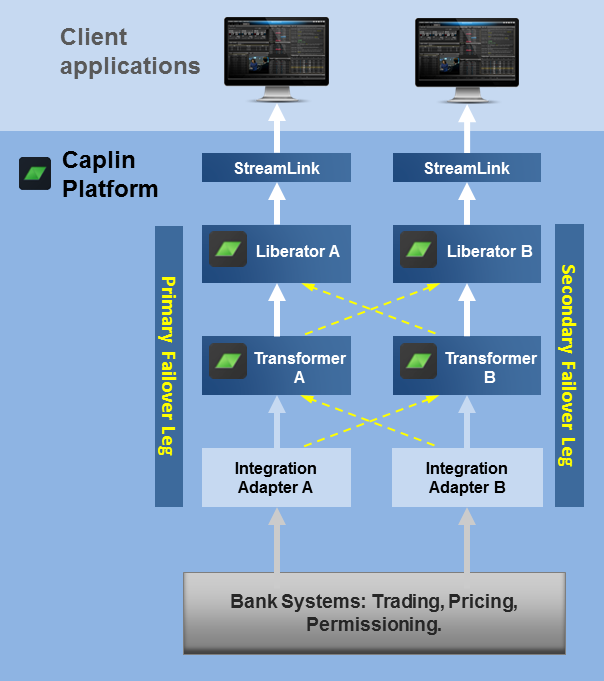
If Transformer A on the primary leg fails (or its connection to Liberator A fails), Liberator A fails over to use Transformer B on the secondary leg, automatically resubscribing to the relevant instruments on Transformer B. Conversely, if Transformer B on the primary leg fails (or its connection to Liberator B), Liberator B fails over to use Transformer A, and resubscribes.
In the same way, if Integration Adapter A fails (or its connection to Transformer A fails), Transformer A fails over to use Integration Adapter B, automatically resubscribing to the relevant instruments on Integration Adapter B. And if Integration Adapter B fails (or its connection to Transformer B), Transformer B fails over to use Integration Adapter A, and resubscribes.
**📌 NOTE**\
The diagram doesn’t show the situation where a Liberator fails or the connection to it is lost. For JavaScript clients, this is handled at the client by [StreamLink JS](https://docs.caplin.com/developer/api/streamlinkjs/latest/), which fails over to an alternate Liberator. For more about this, see [Resilience in StreamLink](../streamlink/streamlink-resilience-in-streamlink.md).
## Determining the failover architecture
Failover components for each leg can be deployed to a single server machine, but in general, for failover to work effectively, you should deploy the components for each failover leg on different server machines. The first step in configuring failover is to decide which server machines you need the failover components to run on.
You can deploy any number of components to a single Deployment Framework, but they must all be either primary leg components or secondary leg components, and not a mixture of both. If for some reason the same server machine must host both primary and secondary leg components, you need to install two Deployment Frameworks on that machine; one containing the primary components and the other containing the secondary components.
## Deploying failover components
* Deploy Liberator and Transformer components to the primary and secondary server machines on which they will run
* Deploy blade components to all the server machines in your system.
For more on how to deploy the components, see [Deploy Platform components to the Framework](cdf-deploy-platform-components-to-the-framework.md).
## Configuring server hostnames
Configure the hostnames of the server machines that host the primary and secondary failover components. The following example sets the primary host server to `prodhost1` and the secondary host server to `prodhost2`:
```
./dfw hosts Liberator prodhost1 prodhost2
./dfw hosts Transformer prodhost1 prodhost2
./dfw hosts FXDataExample prodhost1 prodhost2
```
**📌 NOTE**\
Ensure that each primary and secondary host is configured to an actual hostname or IP address. Don’t use the hostname `localhost` in failover configurations.
In a single server deployment, the configured hostname can be set to localhost (which is the default setting), but it’s good practice to always set it to the actual hostname of the server. You can also specify the hostname as the IP address of the server.
For more about setting hostnames, see [Change server hostnames](cdf-change-server-specific-configuration.md#change-server-hostnames) in How Can I... [Change server-specific configuration](cdf-change-server-specific-configuration.md).
## Enabling failover
Follow the steps below:
1. In the file _<Framework-root>/global_config/environment.conf_ on each primary server machine, change the definition of `FAILOVER` from `DISABLED` to `ENABLED`.
2. In the file _<Framework-root>/global_config/environment.conf_ on each secondary server machine:
1. Change the definition of `FAILOVER` from `DISABLED` to `ENABLED`.
2. Change the definition of `NODE` from `PRIMARY` to `SECONDARY`.
3. Change the definition of `THIS_LEG` from `1` to `2`.
4. Change the definition of `OTHER_LEG` from `2` to `1`.
5. If your deployment includes Liberator, change the definition of `LIBERATOR_CLUSTER_NODE_INDEX` to `1`.
6. If your deployment includes Transformer, change the definition of `TRANSFORMER_CLUSTER_NODE_INDEX` to `1`.
7. Run the command below to regenerate the Deployment Framework’s hosts file:
```
./dfw hosts
```
**📌 NOTE**\
Enabling failover automatically enables Liberator and Transformer clustering.
Here’s an example showing failover enabled on a primary server and a secondary server. Changed items are highlighted.
**Primary server: global_config/environment.conf**
```text
#
# Failover definitions.
#
define THIS_LEG 1
define OTHER_LEG 2
define FAILOVER ENABLED
define NODE PRIMARY
define LIBERATOR_CLUSTER_NODE_INDEX 0
define TRANSFORMER_CLUSTER_NODE_INDEX 0
#
# Data service priority scheme.
#
define LOAD_BALANCING ENABLED
```
**Secondary server: global_config/environment.conf**
```text
#
# Failover definitions.
#
define THIS_LEG 2
define OTHER_LEG 1
define FAILOVER ENABLED
define NODE SECONDARY
define LIBERATOR_CLUSTER_NODE_INDEX 1
define TRANSFORMER_CLUSTER_NODE_INDEX 1
#
# Data service priority scheme.
#
define LOAD_BALANCING ENABLED
```
## Setting data service priority
When you configure failover, the data services in the Deployment Framework default to load balancing priority. With this setting, each new subscription is sent to the failover leg that has the least number of outstanding subscriptions, so that when a leg fails, only half of the subscriptions need to be moved across to the alternate leg.
You can change the data service priority configuration to "failover" priority. This results in all subscriptions being always sent to the primary leg; they aren’t load balanced across the legs. If the primary leg fails, all the subscriptions are moved to the secondary leg.
To change the data service priority to "failover" configuration, edit _<Framework-root>/global_config/environment.conf_ in all the Deployment Frameworks on all the server machines of your deployment. Change the definition of `LOAD_BALANCING` to `DISABLED`.
Here’s an example showing the data service set to "failover". Changed items are highlighted.
**Primary server: global_config/environment.conf**
```text
#
# Failover definitions.
#
define THIS_LEG 1
define OTHER_LEG 2
define FAILOVER ENABLED
define NODE PRIMARY
define LIBERATOR_CLUSTER_NODE_INDEX 0
define TRANSFORMER_CLUSTER_NODE_INDEX 0
#
# Data service priority scheme.
#
define LOAD_BALANCING DISABLED
```
**Secondary server: global_config/environment.conf**
```text
#
# Failover definitions.
#
define THIS_LEG 2
define OTHER_LEG 1
define FAILOVER ENABLED
define NODE SECONDARY
define LIBERATOR_CLUSTER_NODE_INDEX 1
define TRANSFORMER_CLUSTER_NODE_INDEX 1
#
# Data service priority scheme.
#
define LOAD_BALANCING DISABLED
```
For more about the data service priority options, see [Data services](../datasource/datasource-data-services.md) and [Data services configuration](../datasource/datasource-data-services-configuration.md).
## Starting the failover-configured system
1. On each Deployment Framework on each server machine in your system, start up all the deployed core components and Adapter blades:
```
./dfw start
```
2. If you’ve installed the [Caplin Management Console](../cmc/index.md) (CMC), and enabled JMX [monitoring](../platform-architecture/monitoring-and-management.md) of Liberator, Transformer and your Integration Adapters, you can use it to check that all primary and secondary components have started and are interconnected as expected.
- 💡 TIP
-
If you encounter problems starting the system:
1. Review the configured hosts using the `./dfw hosts` command.
2. Review the _<Framework-root>global_config/environment.conf_ files for each Deployment Framework on each server machine.
If you don’t find any obvious configuration errors, contact **Caplin Support**.