# Enabling the REST adapter
This page describes how to enable the REST adapter and configure it to relay requests to a REST service.
**Available from:** Liberator 8.0.0
**Requires:** OpenJDK 17/21, Caplin StreamLink 8.0.0, Caplin Deployment Framework 8.0.0
## Enabling the REST adapter
Follow the steps below:
1. Shutdown all components in your deployment:
```
$ ./dfw stop
```
2. Activate the REST adapter blade
```
$ ./dfw activate LiberatorRESTAdapter
```
3. Set the primary and secondary host on which the REST adapter should run:
```
$ ./dfw hosts LiberatorRESTAdapter localhost localhost
```
4. Configure the adapter to map one or more REST endpoints to Caplin Platform subjects. See [Mapping a REST endpoint to a Caplin Platform subject](#mapping-a-rest-endpoint-to-a-caplin-platform-subject), below.
5. Restart deployment components:
```
$ ./dfw start
```
## Configuring HTTPS support
By default, the REST Adapter verifies server TLS certificates against the default Java CA TrustStore. To specify a different TrustStore, or to specify a client-certificate to use in mutually-authenticated TLS, see the configuration options below:
* [SslTrustStorePath](../../caplin-platform/liberator/liberator-rest-configuration#ssltruststorepath)
* [SslTrustStorePassword](../../caplin-platform/liberator/liberator-rest-configuration#ssltruststorepassword)
* [SslKeyStorePath](../../caplin-platform/liberator/liberator-rest-configuration#sslkeystorepath)
* [SslKeyStorePassword](../../caplin-platform/liberator/liberator-rest-configuration#sslkeystorepassword)
## Mapping a REST endpoint to a Caplin Platform subject
Follow the steps below:
1. Shutdown all components in your deployment:
```
$ ./dfw stop
```
2. In the REST Adapter’s `datasource.conf` override file, add a [`add-rest-mapping`](liberator-rest-configuration.md#add-rest-mapping) block that maps requests beginning _prefix_ to __REST_base_URL__.
**global_config/overrides/LiberatorRESTAdapter/DataSource/etc/datasource.conf**
```
add-rest-mapping
subject-prefix __prefix__
base-url __REST_base_URL__
end-rest-mapping
```
**Mapping requests to the Open-Meteo weather REST service**
To map requests for subjects beginning `/WEATHER/…` to the Open-Meteo endpoint https://api.open-meteo.com/v1/, use the configuration below:
**global_config/overrides/LiberatorRESTAdapter/DataSource/etc/datasource.conf**
```
add-rest-mapping
subject-prefix /WEATHER/
base-url https://api.open-meteo.com/v1/
end-rest-mapping
```
3. In each `add-data-service` block in the REST Adapter’s `rttpd.conf` override file, add an `include-pattern` option for _subject-prefix_:
**global_config/overrides/LiberatorRESTAdapter/Liberator/etc/rttpd.conf**
```
if "${RESTADAPTER_DISCOVERY_ENABLED}" == ""
add-data-service
service-name LiberatorRESTAdapter${THIS_LEG}
service-type rest
include-pattern ^__subject_prefix__
…
end-data-service
else
add-data-service
service-name LiberatorRESTAdapter
service-type rest
include-pattern ^__subject_prefix__
…
end-data-service
endif
```
**Routing requests for /WEATHER/… to the REST Adapter**
To configure Liberator to route requests for `/WEATHER/…` to the REST Adapter, use the `include-pattern` option below:
**global_config/overrides/LiberatorRESTAdapter/Liberator/etc/rttpd.conf**
```
if "${RESTADAPTER_DISCOVERY_ENABLED}" == ""
add-data-service
service-name LiberatorRESTAdapter${THIS_LEG}
service-type rest
include-pattern ^/WEATHER/
…
end-data-service
else
add-data-service
service-name LiberatorRESTAdapter
service-type rest
include-pattern ^/WEATHER/
…
end-data-service
endif
```
## Testing your configuration
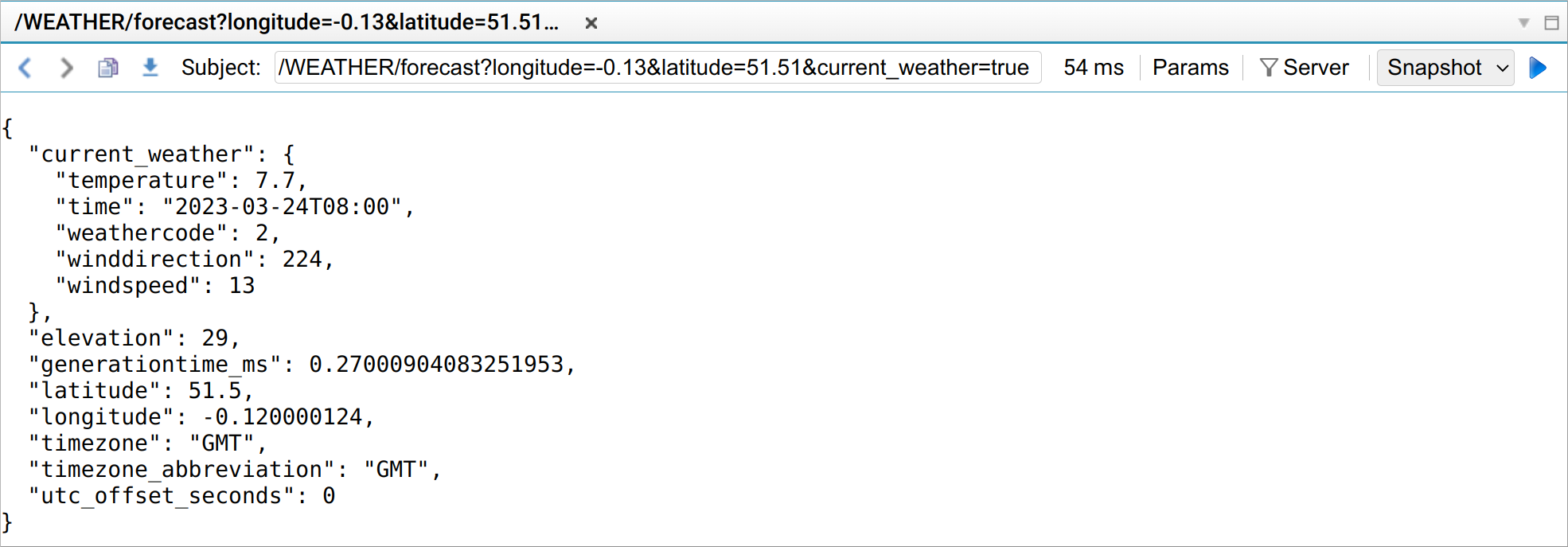
In development and test environments, use the diagnostic tool Liberator Explorer to make test requests to the REST Adapter. Liberator Explorer is packaged in the default Liberator website (blade `LiberatorWebsite`).
**❗ IMPORTANT**\
The `LiberatorWebsite` blade is not supported in production environments. Deactivate the `LiberatorWebsite` blade and activate the `MinimalLiberatorWebsite` blade.
Follow the steps below:
1. In a web browser, navigate to your Liberator’s website (for example, http://localhost:18080)
2. Click **View Diagnostics > Liberator Explorer**
3. Type the following subject in Liberator Explorer’s subject bar:
```
/WEATHER/forecast?longitude=-0.13&latitude=51.51¤t_weather=true
```
4. Select **Snapshot** from the dropdown
5. Click the go button ( icon:play[] )
---
**See also:**
* [Liberator REST adapter](liberator-rest-adapter.md)
* [REST adapter configuration](liberator-rest-configuration.md)