# Using the Liberator REST Adapter
This article explains how to enable the [Liberator REST Adapter](./liberator-rest-adapter.md) and how to configure it to forward requests on to a REST API service on behalf of the Caplin Platform. It will also cover how to make GET, POST, PUT, and DELETE REST operations from a StreamLink client.
The REST API service used in this tutorial is a demo API embedded within the REST Adapter for testing purposes.
We’ve assumed that you use the [Caplin Deployment Framework](../deployment-framework/index.md) to manage your installation, and that you’ve already installed the Deployment Framework and Liberator. For more information on installing the Deployment Framework and deploying Caplin components to it, see [here](../deployment-framework/cdf-installing-the-deployment-framework.md).
## Enable the Liberator REST Adapter
The Liberator REST Adapter is disabled by default when you first install Liberator. To enable it, follow the steps in [Enabling the REST Adapter](./liberator-rest-enabling.md#enable).
## Enable the demo REST API service in the REST Adapter
The REST Adapter provides a basic demo REST API service that allows users to fetch, add, edit and delete prices (bid and ask) for currency pairs.
**⚠️ WARNING**\
The demo REST API is provided for testing purposes only and should be disabled when using the REST Adapter in production. Data is held in an in-memory database and is reset each time the REST Adapter is restarted
Add the following configuration to the REST Adapter’s `datasource.conf` override file:
Follow the steps below:
1. In the REST Adapter’s `datasource.conf` override file, set the configuration below:
**global_config/overrides/LiberatorRESTAdapter/DataSource/etc/datasource.conf**
```macros"
xref:liberator-rest-configuration.md#rest-api-port[`rest-api-port`] _integer_
xref:liberator-rest-configuration.md#enable-demo-rest-api[`enable-demo-rest-api`] true
xref:liberator-rest-configuration.md#demo-rest-api-credentials[`demo-rest-api-credentials`] _username_ _password_
```
**Enabling the demo REST API in the REST Adapter**
The following configuration instructs the REST Adapter to start up the REST API service on port `8099` and authorise requests for user `user1`.
```
rest-api-port 8099
enable-demo-rest-api true
demo-rest-api-credentials user1 user1password
```
2. Restart the REST Adapter
3. Run the `**curl**` command below to test your configuration:
```
curl --request GET \
--url http://localhost:8099/demorestapi/fxprices \
--header 'Authorization: Basic dXNlcjE6dXNlcjFwYXNzd29yZA=='
```
## Demo REST API specification
The DEMO Rest API supports the following methods:
Retrieve all currency pairs with bid and ask prices
| | |
| --- | --- |
| **Method** | `GET` |
| **Path** | `/demorestapi/fxprices` |
| **Headers** | `Authorization: Basic __credentials__` |
| **Request Body** | __none__ |
| **Example** | `**GET** /demorestapi/fxprices` |
Submit a new currency pair with bid and ask prices
| | |
| --- | --- |
| **Method** | `POST` |
| **Path** | `/demorestapi/fxprices` |
| **Headers** | `Authorization: Basic __credentials__` |
| **Request Body** | [source,json,subs="+quotes"] |
```
{
"bidPrice": __bid_price__,
"askPrice": __ask_price__,
"currencyPair": "__currency_pair__"
}
```
| **Example** | `**POST** /demorestapi/fxprices` |
```json
{
"bidPrice": 1.2682,
"askPrice": 1.2681,
"currencyPair": "GBPUSD"
}
```
Update bid and/or ask price for a currency pair
| | |
| --- | --- |
| **Method** | `PUT` |
| **Path** | `/demorestapi/fxprices/__currency_pair__` |
| **Headers** | `Authorization: Basic __credentials__` |
| **Request Body** | [source,json,subs="+quotes"] |
```
{
"bidPrice": __bid_price__,
"askPrice": __ask_price__
}
```
| **Example** | `**PUT** /demorestapi/fxprices/GBPUSD` |
```json
{
"bidPrice": 1.2682,
"askPrice": 1.2681
}
```
Delete a currency pair
| | |
| --- | --- |
| **Method** | `DELETE` |
| **Path** | `/demorestapi/fxprices/__currency_pair__` |
| **Headers** | `Authorization: Basic __credentials__` |
| **Request Body** | __none__ |
| **Example** | `**DELETE** /demorestapi/fxprices/GBPUSD` |
## Mapping a REST endpoint to a Caplin Platform subject
In order to route Platform requests for a chosen subject to the REST API service, it is necessary to configure the REST endpoint mapping in the REST Adapter…
**global_config/overrides/LiberatorRESTAdapter/DataSource/etc/datasource.conf**
```
add-rest-mapping
subject-prefix __prefix__
base-url http://localhost:__api_port__/demorestapi
end-rest-mapping
```
… and to add the `subject-prefix` to Liberator’s data service configuration…
**global_config/overrides/LiberatorRESTAdapter/Liberator/etc/rttpd.conf**
```
if "${RESTADAPTER_DISCOVERY_ENABLED}" == ""
add-data-service
service-name LiberatorRESTAdapter${THIS_LEG}
service-type rest
include-pattern __prefix__
…
end-data-service
else
add-data-service
service-name LiberatorRESTAdapter
service-type rest
include-pattern __prefix__
…
end-data-service
endif
```
See [Mapping a REST endpoint to a Caplin Platform subject](./liberator-rest-enabling.md#configure).
**Mapping requests to the demo REST API service**
The following configuration will instruct the REST Adapter to route all requests on the `/DEMORESTAPI` subject to the demo REST API. Note that the port used in the url is the same as that configured as the [`rest-api-port`](liberator-rest-configuration.md#rest-api-port) earlier.
**global_config/overrides/LiberatorRESTAdapter/DataSource/etc/datasource.conf**
```
add-rest-mapping
subject-prefix /DEMORESTAPI/
base-url http://localhost:8099/demorestapi/
end-rest-mapping
```
In each `add-data-service` block in the REST Adapter’s `rttpd.conf` override file, add an `include-pattern` option for `/DEMORESTAPI`.
**global_config/overrides/LiberatorRESTAdapter/Liberator/etc/rttpd.conf**
```
include-pattern ^/DEMORESTAPI
```
### Testing your configuration
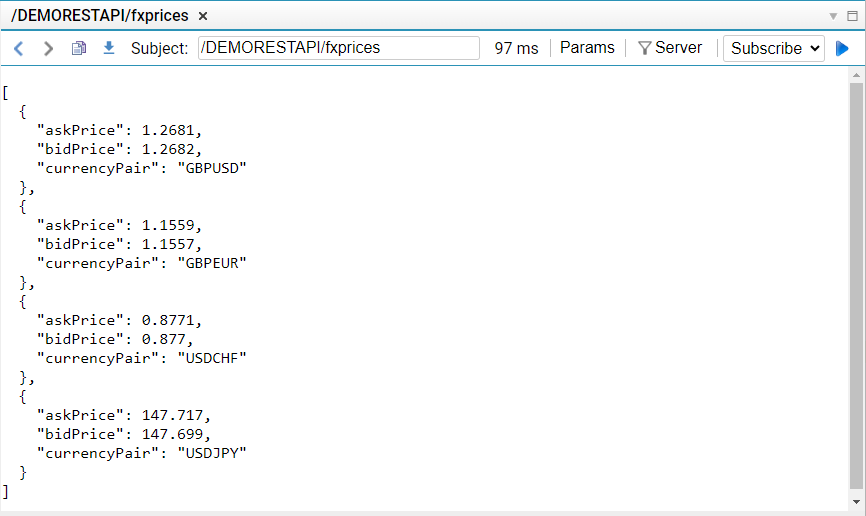
Restart the Platform and follow the steps below to test requests to the REST service through the REST Adapter using the Liberator Explorer diagnostic tool:
1. In a web browser, navigate to your Liberator’s website (for example, http://localhost:18080)
2. Click **View Diagnostics > Liberator Explorer**
3. Type the following subject in Liberator Explorer’s subject bar:
```
/DEMORESTAPI/fxprices
```
4. Select **Snapshot** from the dropdown
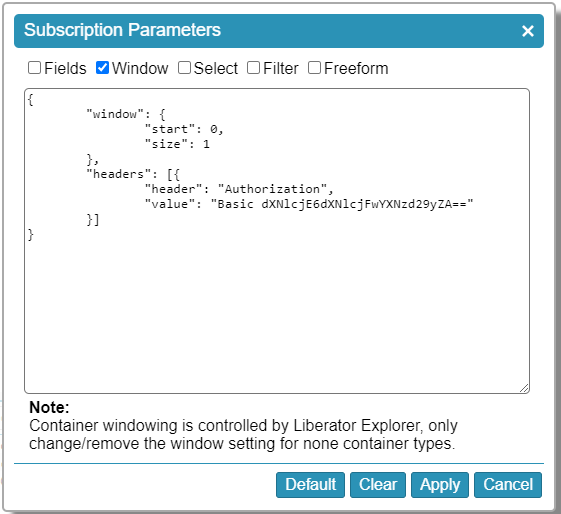
5. Click the **Params** button, add the `Authorization` header (Base64-encoded username and password), then click the **Apply** button
6. Click the go button ( icon:play[] )
## Making StreamLink Requests to the REST Adapter
This section covers the composition of StreamLink requests for interacting with the REST API service when building a Caplin Platform client application. We will use the [StreamLink methods](liberator-rest-adapter.md#http-methods) corresponding to GET, POST, PUT and DELETE operations.
Download [this simple client UI](https://docs.caplin.com/developer/tutorial-resources/platform/rest/demo-rest-api-ui.html) for the demo REST API and open it in an editor of your choice. The page already includes methods to make a StreamLink connection to Liberator and display the connection status. The next few steps will demonstrate how you can wire-up the buttons on the page to fetch data from the UI, create new currency pairs, alter prices for a currency pair, and delete a currency pair.
1. If necessary, change the values for the `liberatorUrl`, `username` and `password` constants to connect to Liberator.
2. Set the `subjectPrefix` constant to match the `subject-prefix` configured earlier in the REST Adapter configuration.
3. The **GET FX Prices** button calls the `getPrices()` function to populate a table with the currency pairs and prices returned from the REST API. Use the [`StreamLink.snapshot()`](https://docs.caplin.com/developer/api/streamlinkts/latest/classes/StreamLink.html#snapshot) method to make the request as follows:
```javascript
streamLink.snapshot(
subjectPrefix + "/fxprices",
subscriptionListener,
{
headers:[{
header:"Authorization",
value:"Basic __credentials__"
}]
}
);
```
This method requests the `/__prefix__/fxprices` subject, also setting the Authorization header as a parameter which will be added to the request made by the REST Adapter to the REST Service. The `subscriptionListener` implements callback functions to:
* log the status of the subscription ([`onSubscriptionStatus`](https://docs.caplin.com/developer/api/streamlinkts/latest/classes/SubscriptionListener.html#onSubscriptionStatus))
* display data received ([`onJsonUpdate`](https://docs.caplin.com/developer/api/streamlinkts/latest/classes/SubscriptionListener.html#onJsonUpdate))
* display a subscription error ([`onSubscriptionError`](https://docs.caplin.com/developer/api/streamlinkts/latest/classes/SubscriptionListener.html#onSubscriptionError))
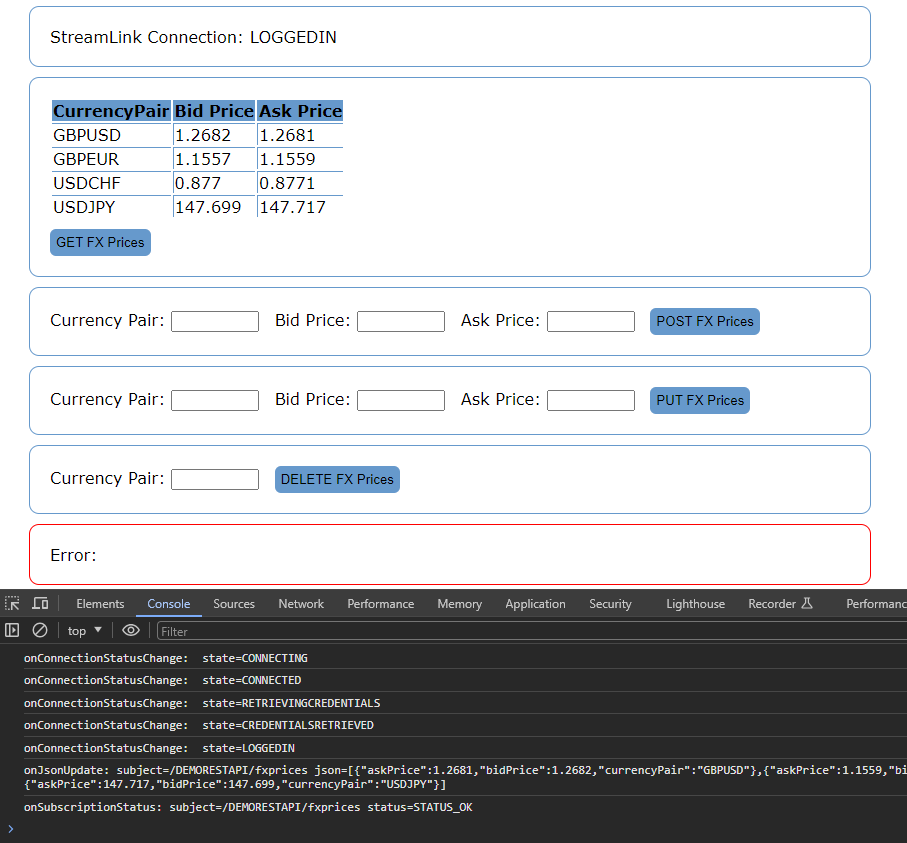
4. Open the page in the browser and click the **GET FX Prices** button. You should notice that the subscription status messages are output in the browser’s console and ultimately a table is created containing the data received from the REST service.
5. At this point it is worth taking a look at the REST Adapter log in
`/kits/LiberatorRESTAdapter/DataSource/var/event-RESTAdapter.log` which shows the following events taking place behind the scenes.
**REST Adapter log messages following an example request for /DEMORESTAPI/fxprices**
**📌 NOTE**\
Some configuration changes may be required to the LiberatorRESTAdapter blade to output all the log lines shown below. Try setting `log-level FINER` and `log-use-parent-handlers TRUE`.
1. Liberator opens a JSON Channel and sends in a JSON message containing the request details i.e. the REST verb (`GET`), the path (`/DEMORESTAPI/fxprices`) and the parameters (`headers`).
```
INFO: Opening RestRequestChannel com.caplin.datasource.internal.channel.JsonChannelImpl@44f26d3a
…
FINER: In: Peer 0 UpdatePacket [subject=/DEMORESTAPI/fxprices/0x29L667rLHU0Z6JMCWL4L/admin-0, type=JSON, fields=[={ "verb":"GET", "path":"/DEMORESTAPI/fxprices", "headers":[{"header":"Authorization", "value":"Basic dXNlcjE6dXNlcjFwYXNzd29yZA=="}] }], flags=5168, seqnum=8]
…
INFO: Received message JSON, Subject=, Image=true, Json=<{ "verb":"GET", "path":"/DEMORESTAPI/fxprices", "headers":[{"header":"Authorization", "value":"Basic dXNlcjE6dXNlcjFwYXNzd29yZA=="}] }>, jsonTree=<{"verb":"GET","path":"/DEMORESTAPI/fxprices","headers":[{"header":"Authorization","value":"Basic dXNlcjE6dXNlcjFwYXNzd29yZA=="}]}> on RestRequestChannel JSON, Subject=, Image=true, Json=<{ "verb":"GET", "path":"/DEMORESTAPI/fxprices", "headers":[{"header":"Authorization", "value":"Basic dXNlcjE6dXNlcjFwYXNzd29yZA=="}] }>, jsonTree=<{"verb":"GET","path":"/DEMORESTAPI/fxprices","headers":[{"header":"Authorization","value":"Basic dXNlcjE6dXNlcjFwYXNzd29yZA=="}]}>
```
2. The REST Adapter matches the path to a REST endpoint mapping in its configuration based on the path’s prefix (`/DEMORESTAPI` maps to the url `http://localhost:8099/demorestapi/`).
```
FINER: Mapping "/DEMORESTAPI/" found for subject "/DEMORESTAPI/fxprices".
```
3. The GET request is made using the request headers provided.
```
INFO: Submitting HTTP GET request to endpoint /DEMORESTAPI/
FINE: Configured endpoint for request : "http://localhost:8099/demorestapi/fxprices"
FINE: baseURL is: http://localhost:8099/demorestapi/
INFO: Using Authorization header provided in request headers.
```
4. The response received is mapped to JSON. (No mapping necessary in this case as the Content-Type for the response was `application/json`.)
```
INFO: Received response for subject /DEMORESTAPI/fxprices: Status=200 OK
FINE: Response for subject /DEMORESTAPI/fxprices has Content Type=application/json
FINE: Mapping json response from url http://localhost:8099/demorestapi/fxprices
```
5. A JSON message is sent back to Liberator on the JSON Channel which contains the HTTP response code received from the REST API service (`200`) and the payload (response body).
```
INFO: Returning REST response for subject /DEMORESTAPI/fxprices/0x29L667rLHU0Z6JMCWL4L/admin-0 with code: "200" and body: "[{"currencyPair":"GBPUSD","bidPrice":1.2682,"askPrice":1.2681},{"currencyPair":"GBPEUR","bidPrice":1..."
FINER: Out: Peer 0 UpdatePacket [subject=/DEMORESTAPI/fxprices/0x29L667rLHU0Z6JMCWL4L/admin-0, type=JSON, fields=[(0)={"code":"200","payload":[{"currencyPair":"GBPUSD","bidPrice":1.2682,"askPrice":1.2681},{"currencyPair":"GBPEUR","bidPrice":1.1557,"askPrice":1.1559},{"currencyPair":"USDCHF","bidPrice":0.877,"askPrice":0.8771},{"currencyPair":"USDJPY","bidPrice":147.699,"askPrice":147.717}]}], flags=4144, seqnum=15]
```
6. The JSON Channel between Liberator and the REST Adapter is closed.
```
INFO: Closing RestRequestChannel com.caplin.datasource.internal.channel.JsonChannelImpl@44f26d3a
```
6. The **POST FX Prices** button calls the `postPrice()` function to extract the values from the form and submit these to the REST API service. Use the [`StreamLink.create()`](https://docs.caplin.com/developer/api/streamlinkts/latest/classes/StreamLink.html#create) method to make the request as follows:
```javascript
streamLink.create(
subjectPrefix + "/fxprices",
{
payload: obj,
payloadType: caplin.streamlink.PayloadType.JSON,
headers:[{
header:"Authorization",
value:"Basic __credentials__"
}]
},
commandListener
);
```
This time the parameters also include the payload (JSON object composed of the `currencyPair`, `bidPrice` and `askPrice` extracted from the form, which will be sent to the REST Service as request body) and payload type (JSON). The `commandListener` implements callback functions to:
* refresh the prices on screen if the `create` command succeeds by triggering the `getPrices()` function ([`onCommandOk`](https://docs.caplin.com/developer/api/streamlinkts/latest/classes/CommandListener#onCommandOk))
* display an error if the `create` command does not succeed ([`onCommandError`](https://docs.caplin.com/developer/api/streamlinkts/latest/classes/CommandListener#onCommandError))
+

1. Use the StreamLink API to implement the calls to modify an existing currency pair prices (use [`StreamLink.publish()`](https://docs.caplin.com/developer/api/streamlinkts/latest/classes/StreamLink.html#publish) in the `putPrice()` function) and delete an existing currency pair (use [`StreamLink.delete()`](https://docs.caplin.com/developer/api/streamlinkts/latest/classes/StreamLink.html#delete) in the `deletePrice()` function). Each time observe the REST Adapter logs to see how the REST Adapter channels the requests to the REST API Service.
---
**See also:**
* [Liberator REST Adapter](liberator-rest-adapter.md)
* [Enabling the REST Adapter](liberator-rest-enabling.md)
* [REST Adapter Configuration](liberator-rest-configuration.md)
* [Authentication & Authorization via the REST Adapter](liberator-rest-authentication.md)