# Implementing Historic Search
This page provides a guide to the changes you need to make to your integration adapters to implement FX Sales' Historic Search feature.
## Requirements
To provide a backend implementation of the Historic Search, you require the following:
* **Front end**: Caplin FX Sales 2.13 or greater
* **Back end**: A trading integration adapter based on the FX Integration API 3.49 or greater.
## Implementation checklist
To enable the use of Historic Search in your instance of Caplin FX Sales, perform each of the tasks below:
* Create an implementation of a search blotter listener
* Create an implementation of a configuration provider
* Grant user permissions
* Enable Historic Search
For a working example of an adapter with a Historic Search implementation, see the Novo Trading Adapter example in the FX Integration API Kit (v3.50 or greater).
## Implementing a search blotter provider
To implement a search blotter provider, follow the steps below:
1. Create an implementation of the [SearchBlotterListener,opts="nofollow"](https://docs.caplin.com/developer/api/fxintegration/3.68/com/caplin/motif/fx/search/SearchBlotterListener.html) interface:
```plantuml
@startuml
package com.caplin.motif.fx.search {
interface SearchBlotterListener {
+initialise(BlotterConfiguration, BlotterItemFactory)
+searchChannelOpened(SearchBlotterChannel, SearchExpression)
+searchChannelClosed(SearchBlotterChannel)
}
}
class MySearchBlotterListener {
+initialise(BlotterConfiguration, BlotterItemFactory)
+searchChannelOpened(SearchBlotterChannel, SearchExpression)
+searchChannelClosed(SearchBlotterChannel)
}
SearchBlotterListener <|-- MySearchBlotterListener
@enduml
```
2. In your implementation’s `searchChannelOpened` method, perform the following tasks:
1. Refering to the `SearchExpression` parameter, build a query to a source of historical data (for example, a database). For more information see [Search expression syntax](#search-expression-syntax) and [Parsing a search expression](#parsing-a-search-expression).
2. For each trade returned by your query, create a blotter item using the `BlotterItemFactory` instance passed to your implementation in the `initialise` method. Publish each blotter item with the `SearchBlotterChannel.sendBlotterItem` method.
3. Register your implementation of `SearchBlotterListener` with an instance of [FXTradeBlotterAdapter,opts="nofollow"](https://docs.caplin.com/developer/api/fxintegration/3.68/com/caplin/motif/fx/trading/FXTradeBlotterAdapter.html):
```java
FXTradeBlotterAdapter blotterAdapter = new FXTradeBlotterAdapter(dataSource);
blotterAdapter.registerSalesExecutionSearchBlotterListener(
new MySearchBlotterListener());
```
### Search expression syntax
The Historic Search subject takes the following format:
```
/PRIVATE/FX/SALES/BLOTTER/SEARCH/EXECUTION/searchFilter=__search_expression__
```
The __search_expression__ is a string with the following format:
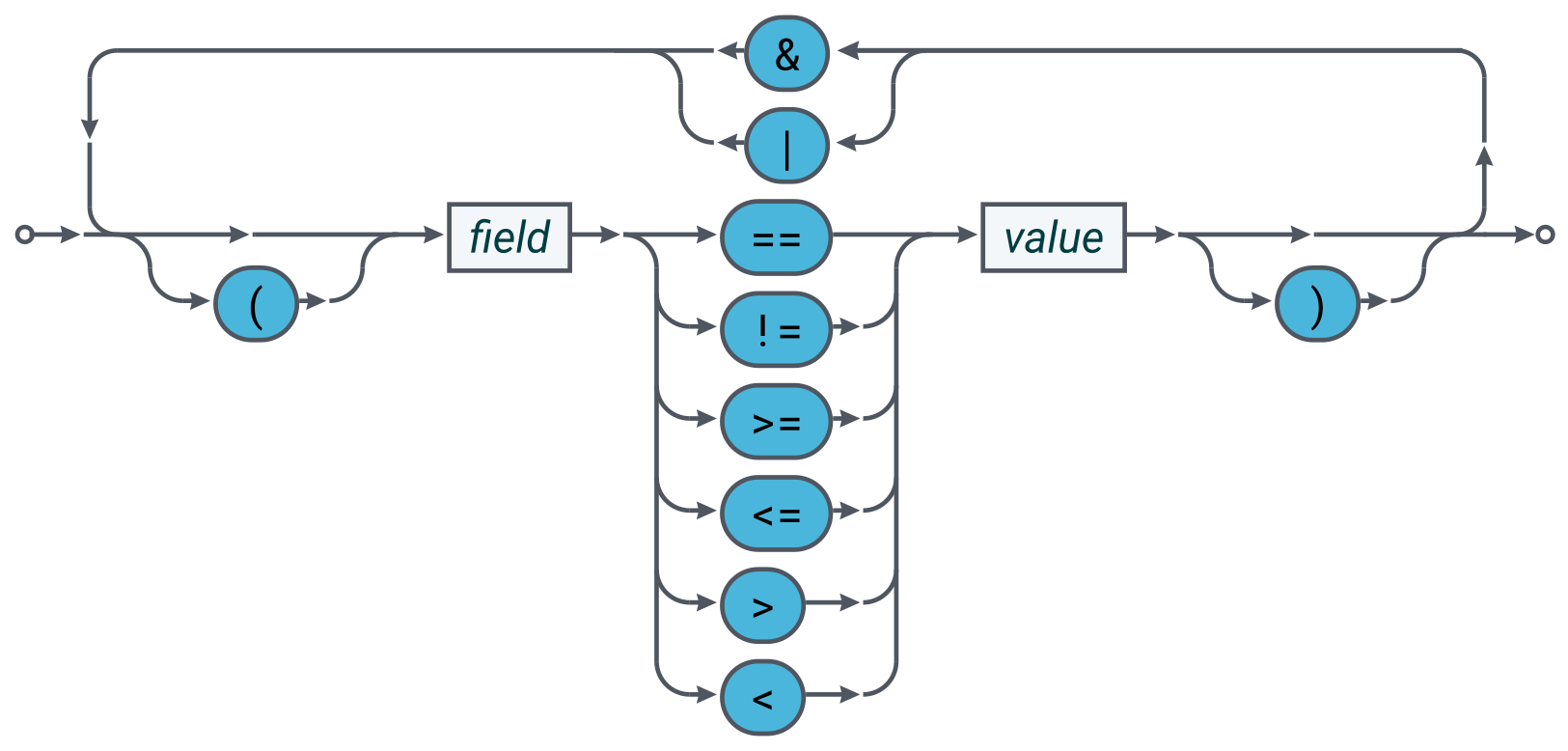
**Boolean operators (in order of precedence)**
| Operator | Description |
| --- | --- |
| & | Logical AND |
| \ | |
**Comparators**
| Comparator | Description |
| --- | --- |
| == | Equals |
| != | Not Equals |
| >= | Greater Than or Equal To |
| \<= | Less Than or Equal To |
| > | Greater Than |
| < | Less Than |
Example search subjects:
* `/PRIVATE/FX/SALES/BLOTTER/SEARCH/EXECUTION/searchFilter=#Status==Completed#`
* `/PRIVATE/FX/SALES/BLOTTER/SEARCH/EXECUTION/searchFilter=#Status==Completed&(Amount>1000&Amount\<=2000)#`
### Parsing a search expression
The FX Integration API parses the search expression and passes it to the `SearchBlotterListener.searchChannelOpened` method as a parse tree of [`SearchExpression`,opts="nofollow"](https://docs.caplin.com/developer/api/fxintegration/3.68/com/caplin/motif/fx/search/SearchExpression.html) objects.
**SearchExpression class and associated enumerators**
```plantuml
@startuml
'Stop syntax warning: Bad hierarchy for class com.caplin.motif.fx.search.SearchExpression.Type
'For more details, see news for 2 Feb 2023: https://plantuml.com/news
set separator none
package com.caplin.motif.fx.search {
class SearchExpression {
+SearchExpression.Type getType()
+String getText()
+SearchOperator getOperator()
+SearchComparator getComparator()
+SearchExpression getLeft()
+SearchExpression getRight()
}
enum SearchOperator {
AND
OR
}
enum SearchComparator {
EQ
GT
GTE
LT
LTE
NE
}
enum SearchExpression.Type {
COMPARATOR
OPERATOR
TEXT
}
SearchExpression +-- SearchExpression.Type
}
@enduml
```
Each node in the tree is one of three types:
* `SearchExpression.Type.OPERATOR`: a boolean operator (AND, OR)
* `SearchExpression.Type.COMPARATOR`: a comparator (==, !=, <, >, \<=, >=)
* `SearchExpression.Type.TEXT`: a string operand (a field name or a field value)
For example, the parse tree for the search expression `Field1=ABCDE&Field2>=1000` would be as follows:
**Parse tree for the search expression "Field1==ABCDE&Field2>=1000"**
```plantuml
@startuml
object node1 <> {
type = OPERATOR
operator = AND
}
object node2 <> {
type = COMPARATOR
comparator = EQ
}
object node3 <> {
type = COMPARATOR
comparator = GTE
}
object node4 <> {
type = TEXT
text = "Field1"
}
object node5 <> {
type = TEXT
text = "ABCDE"
}
object node6 <> {
type = TEXT
text = "Field2"
}
object node7 <> {
type = TEXT
text = "1000"
}
node1 o-- node2 : left
node1 o-- node3 : right
node2 o-- node4 : left
node2 o-- node5 : right
node3 o-- node6 : left
node3 o-- node7 : right
@enduml
```
You can use the `SearchExpression` parse tree to build a query to a source of historical data. The example below shows a recursive method that builds a WHERE clause for a SQL query. To keep the example simple, the method makes the following assumptions:
* Trading history is stored in one database table
* Database column names are identical to FX Sales field names
* All columns are string types (TEXT, VARCHAR, CHAR, ...)
**Building a WHERE clause from a SearchExpression parse tree**
```java
private String buildWhereClause(SearchExpression se, String tableName)
{
StringBuilder sb = new StringBuilder();
switch (se.getType()) {
case OPERATOR:
switch (se.getOperator()) {
case AND:
sb.append("(");
sb.append(buildWhereClause(se.getLeft(), tableName));
sb.append(" AND ");
sb.append(buildWhereClause(se.getRight(), tableName));
sb.append(")");
break;
case OR:
sb.append("(");
sb.append(buildWhereClause(se.getLeft(), tableName));
sb.append(" OR ");
sb.append(buildWhereClause(se.getRight(), tableName));
sb.append(")");
break;
}
break;
case COMPARATOR:
String fieldName = se.getLeft().getText();
String fieldValue = se.getRight().getText();
sb.append(tableName).append(".").append(fieldName);
switch (se.getComparator()) {
case EQ:
sb.append("==");
break;
case NE:
sb.append("!=");
break;
case GTE:
sb.append(">=");
break;
case LTE:
sb.append("<=");
break;
case GT:
sb.append(">");
break;
case LT:
sb.append("<");
break;
}
sb.append("'").append(fieldValue).append("'");
break;
case TEXT:
break;
}
return sb.toString();
}
```
## Implementing a search configuration provider
The Historic Search user interface includes a query builder panel above the search results blotter:
**Historic Search user interface**
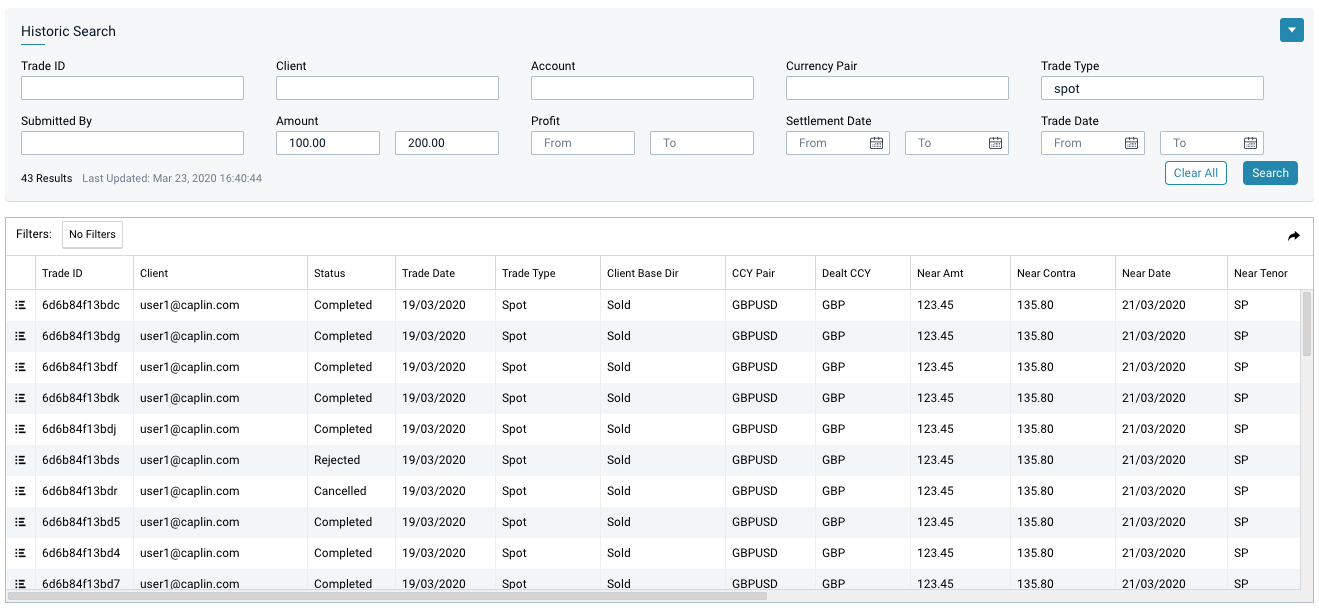
The query builder is rendered automatically based on search field meta-data provided by the FX Integration API’s Configuration Service.
To provide search field meta-data to FX Sales, see [User Config](../fx-integration-api/fxapi-user-config.md) in the FX Integration API documentation.
## Granting permissions
To allow a user to request Historic Search subjects, grant the user (or a group the user belongs to) the following permissions in the global namespace:
**Historic Search permission**
| Field | Description |
| --- | --- |
| Action | VIEW |
| Product | ^/PRIVATE/%u/FX/SALES/BLOTTER/SEARCH/EXECUTION/.* |
| Namespace | |
| Authorisation | ALLOW |
**Filtered Historic Search permission**
| Field | Description |
| --- | --- |
| Action | VIEW |
| Product | ^/FILTER/PRIVATE/%u/FX/SALES/BLOTTER/SEARCH/EXECUTION/.* |
| Namespace | |
| Authorisation | ALLOW |
For instructions on granting users permission to access the FX Integration API’s Configuration Service, see [User Config](../fx-integration-api/fxapi-user-config.md).
Caplin FX Sales uses Caplin’s Permissioning Service to authenticate and authorise users. For more information on the Caplin Permissioning Service and the terms used in the tables above, see [Caplin Platform Architecture > Permissioning](../caplin-platform/platform-architecture/permissioning.md).
## Enabling Historic Search
By default, the Historic Search feature is disabled. To enable this feature in FX Sales, set the the configuration option [HISTORIC_SEARCH.ENABLED](st-fx-sales-configuration.md#historic-search-enabled) to the boolean value `true`.
---
**See also**:
* [Historic Search](st-sales-historic-search.md)
* [User Config](../fx-integration-api/fxapi-user-config.md)
* [Messages in the Motif](st-trade-messages-in-the-motif.md)