# Streaming prices into a tile
This tutorial aims to teach you how to connect to Liberator using StreamLink, and subscribe to prices in the Tile component.
## Objectives
* Connect to Liberator using StreamLink.
* Stream prices into a tile.
## Creating a StreamLink connection
So far we’ve been working with components we’ve created ourselves in our app, but `sljs` is a package provided in the CT5 libraries. We can add sljs to the `package.json`.
1. Add the following line to the dependencies section with the other dependencies:
```
"sljs": "workspace:*"
```
This adds `sljs` as a project dependency from the pnpm workspace, which includes the caplin packages ("myTradingApplication/packages-caplin/sljs"). The package and dependencies are linked in the `node_modules` directory found in `myTradingApplication/apps/tile`.
2. Run the following command to update the node_modules
```
$ pnpm install
```
3. Amend `apps/tile/src/index.js`, which is the application entry point, to import `sljs` and create a connection to Liberator. These lines should be added after the existing imports, and before the `startApp` function is defined:
```js
import {
StreamLinkFactory
} from "sljs";
const streamLink = StreamLinkFactory.create({
username: "admin",
password: "admin",
liberator_urls: "rttp://localhost:18080"
});
streamLink.connect();
```
4. Now restart the app and refresh your browser page:
```
$ pnpm start
```
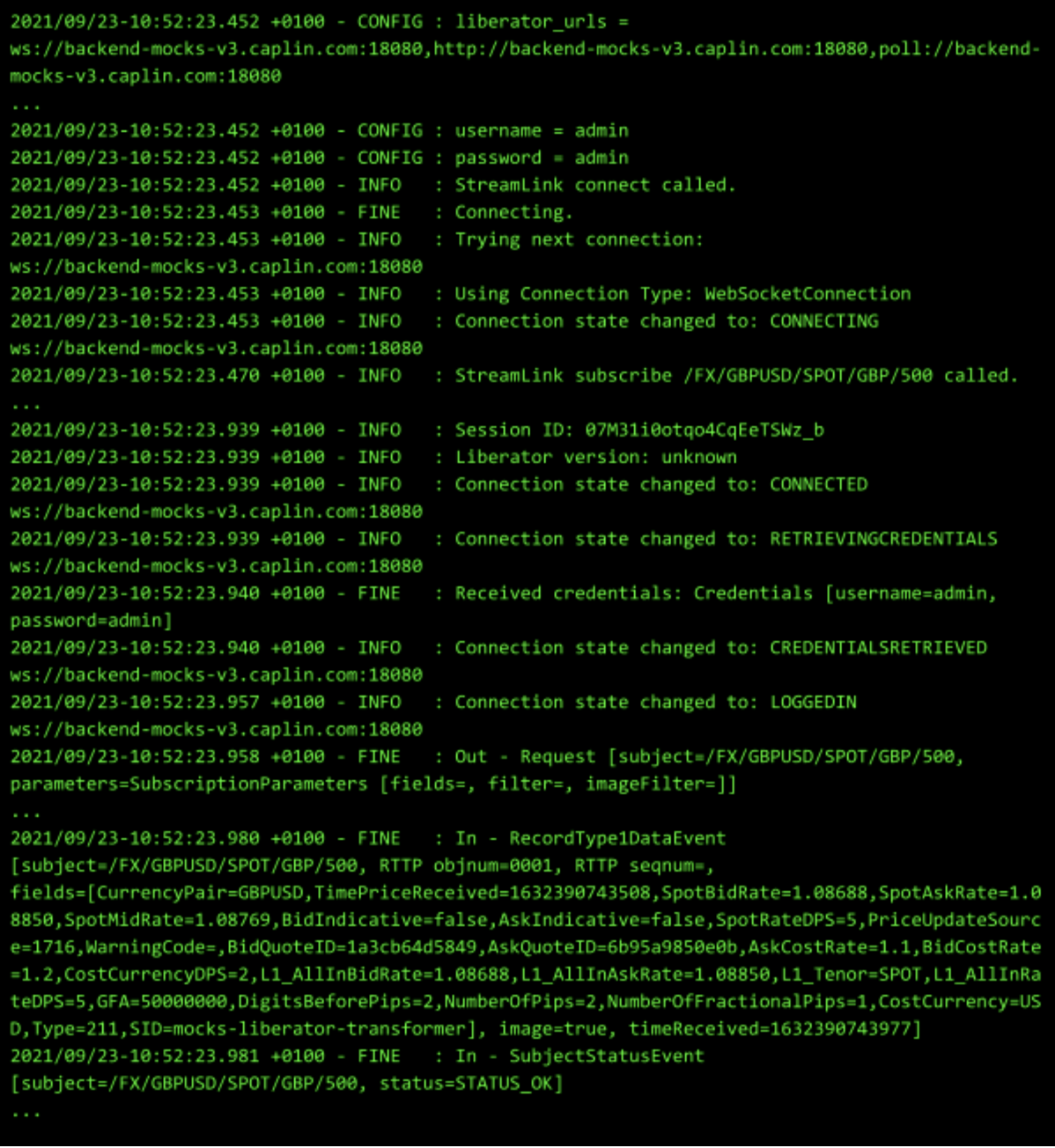
You are now successfully connected to Liberator. StreamLink comes with a built-in log window with detailed logs of all events. This can be useful for debugging or just to confirm that you’re connected to Liberator correctly.
To open the log window, simply add `?debug=fine` to the end of your URL (or `&debug=fine` if you already have a URL parameter) e.g. http://localhost:8080/?debug=fine.
Also check your developer tools in your browser, in the network tab look out for RTTP-TYPE or websocket messages.
## Creating an SLJSTile component
When creating React components it is good practice to keep the presentation logic (what the component looks like and what data it needs) in a separate component to state, this makes the component more reusable.
In our case, the previously created Tile component encapsulates the presentation of the tile. Now we want to create a new component, which connects to Liberator and retrieves price data. Let’s name this new component `SLJSTile`, as it gets its data from the StreamLink API.
### Building the SLJSTile container component
1. Create a new `SLJSTile.js` file in the `apps/tile/src/Tile` directory.
2. Add the following code to the `SLJSTile.js` file.
```js
import React, { useEffect, useState } from "react";
import Tile from "./Tile";
export default function SLJSTile({currencyPair, streamLink}) {
const [rate, setRate] = useState({
bidRate: "-",
askRate: "-",
});
useEffect(() => {
const subscription = streamLink.subscribe(`/FX/${currencyPair}`, {
onRecordUpdate: (subscription, event) => {
const fields = event.getFields();
setRate({
bidRate: fields.BidPrice,
askRate: fields.AskPrice,
});
},
onSubscriptionStatus(event) {
console.log("subscribed:" + event);
},
onSubscriptionError(event) {
console.log("error:" + event);
},
});
// Specify how to clean up after this effect:
return () => {
if (subscription) {
subscription.unsubscribe();
console.log("unsubscribe");
}
};
}, []);
return (
);
}
```
#### Understanding the SLJSTile container component
Ok, let’s break down some of the code introduced above.
* The currency pair and streamlink, which are needed to request the prices from StreamLink, are passed in as props.
```js
export default function SLJSTile({currencyPair, streamLink}) {
const [rate, setRate] = useState({
bidRate:"-",
askRate:"-",
});
}
```
We create state properties for `bidRate` and `askRate`, and initialise both of these to a dash. This provides a default value to display on the buttons before the price data has been received from Liberator.
* we pass the current rate values to the Tile component instead of the mock data from before
```js
return (
<
Tile
currencyPair={currencyPair}
bidRate={rate.bidRate}
askRate={rate.askRate}
/>
);
```
* We use the useEffect hook to make the subscription to streamlink. The `useEffect` hook should be used when code will create side effects (such as changing state) as react isn’t designed to handle state changing during rendering. Inside this method we subscribe to StreamLink for our `currencyPair`. We handle updating prices as well as unsubscribing from StreamLink if the component is unmounted.
```js
useEffect(() => {
const subscription = streamLink.subscribe(`/FX/${currencyPair}`, {
onRecordUpdate: (subscription, event) => {
const fields = event.getFields();
setRate({
bidRate: fields.BidPrice,
askRate: fields.AskPrice,
});
},
onSubscriptionStatus(event) {
console.log("subscribed:" + event);
},
onSubscriptionError(event) {
console.log("error:" + event);
},
});
// Specify how to clean up after this effect:
return () => {
if (subscription) {
subscription.unsubscribe();
console.log("unsubscribe");
}
};
}, []);
```
* Streamlink.subscribe takes a subject and a subscription listener with callbacks for `onRecordUpdate` `onSubscriptionStatus` and `onSubscriptionError`.
* `onRecordUpdate` is called whenever a record is received from liberator. `onSubscriptionStatus` and `onSubscriptionError` are called when status messages and error messages are received respectively.
* In our onRecordUpdate callback we change the state to be the new data from the server. event.getFields() returns the fields sent on the message from the backend.
`useEffect` will call any return function when the hook is cleaned up (either when it reruns or when the component is unmounted). We use this to unsubscribe from streamlink when the component is unmounted. Since we added a dependency array of `[]` to useEffect our function will only be called once. If we wanted it to be called again when the currency pair changed we’d add currency pair to the dependency array (`[currencyPair]`).
## Rendering the SLJSTile
The final step is to update the `apps/tile/src/index.js` file to render the new `SLJSTile` component instead of the old Tile component, passing in the StreamLink instance and currency pair.
1. Change the `import Tile` statement in the `apps/tile/src/index.js` file to `SLJSTile`, as illustrated below:
```js
import SLJSTile from "./tile/SLJSTile";
```
2. Inside the `ReactDOM.render` call, create instances of the `SLJSTile` component instead of Tile, passing in the correct prop values below:
```js
function startApp() {
ReactDOM.render
(
,
document.getElementById ("root")
);
}
```
3. Open the app in your browser by going to http://localhost:8080, and you should see the prices on your tiles updating!
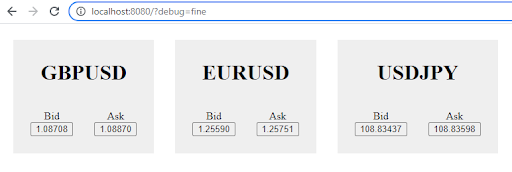
If the prices stay as dashes check that your backend is up and running.
Your output should look similar to the screen below.