
Data services
DataSource applications can obtain data from other DataSource applications through data services. By using a data service, your DataSource application can request objects based on their subject names without needing to know which other DataSource applications supply the objects.
Overview
A data service definition within Liberator defines which of the Integration Adapters connected to the Liberator will supply the data for a particular subject or set of subjects.
You define a data service through configuration, which includes
-
a name that identifies the service,
-
a regular expression pattern that defines the objects the service can supply,
-
the names of the DataSource peers to which requests for the objects are sent.
Here are some examples of how data services are configured.
| In practice, you don’t have to define data service configuration in detail for Liberator and Transformer, because the Caplin Deployment Framework does a lot of the work for you. These examples are just meant to show you how it all works under the hood. |
Example data service
Here’s some Liberator configuration that defines a data service:
# Single FX  Pricing source

add-peer
   remote-name  fxpriceadapter
   remote-label fxpriceadapter
   remote-type active
end-peer

add-data-service
   service-name fx-prices
   include-pattern ^/FX
   add-source-group
      required
      add-priority
         remote-label fxpriceadapter
      end-priority
   end-source-group
end-data-service
First we write an add-peer … end peer configuration item. This defines a DataSource peer connection to an Integration Adapter called fxpriceadapter that supplies FX prices through active subscriptions.
We follow this with an add-data-service … end-data-service configuration item. This defines a data service called fx-prices that gets its data from the fxpriceadapter. The configuration options defined within this item are:
-
service-nameThis defines the name of the data service (fx-prices) -
include-patternThis regular expression specifies that any subscription request whose subject begins with/FXis to be handled by thefx-pricesdata service. -
add-source-group … end-source-groupdefines the DataSource peers that provide the data for thefx-pricesservice. -
requiredmeans that a status stale message or status information message is generated if a DataSource peer within the source group goes down. -
add-priority … end-prioritydefines a priority group (see Failover using data services below). Since in this example there is just one Integration Adapter that supplies the FX prices, the priority group just refers to that one Adapter by itsremote-label fxpriceadapterin theadd-peerconfiguration item.
Specifying multiple sources of data for a service
You can configure a data service to obtain its data from more than one source, like this:
add-peer
   remote-name  fxpriceadapterA
   remote-label fxpriceadapterA
   remote-type active
end-peer

add-peer
   remote-name  fxpriceadapterB
   remote-label fxpriceadapterB
   remote-type active
end-peer

add-data-service
   service-name fx-prices
   include-pattern ^/FX
   add-source-group
      required
      add-priority
         remote-label fxpriceadapterA
      end-priority
   end-source-group
   add-source-group
      required
      add-priority
         remote-label fxpriceadapterB
      end-priority
   end-source-group
end-data-service
In this configuration, we’ve defined two DataSource peers, fxpriceadapterA and fxpriceadapterB, each supplying a different subset of FX instrument prices. The data service configuration is split into two add-source-group sections, so that any subscription request whose subject starts with /FX is sent to both fxpriceadapterA and fxpriceadapterB at the same time, and each Pricing Adapter subsequently sends Liberator the updates for its particular subset of FX instruments.
Because all the DataSource peers are subscribed to at once, this type of data service configuration is best used when the DataSource peer in each source group is responsible for supplying data for a subset of the subject range subscribed to. In the above example, if fxpriceadapterA and fxpriceadapterB each handled all of the /FX instruments, rather than a subset, Liberator would receive duplicate updates for every FX instrument, which would waste communication bandwidth and processor resources.
|
Load balancing using data services
You can deploy multiple instances of an Integration Adapter, all supplying the same data, so that no individual Adapter becomes overloaded. The Liberator’s data service is configured to send each successive subscription request to the Adapter that has the smallest number of existing subscriptions:
# Load balanced FX Pricing sources

add-peer
   remote-name  fxpriceadapter1
   remote-label fxpriceadapter1
   remote-type active
end-peer

add-peer
   remote-name  fxpriceadapter2
   remote-label fxpriceadapter2
   remote-type active
end-peer

add-data-service
   service-name fx-prices
   include-pattern ^/FX
   add-source-group
      required
      add-priority
         remote-label fxpriceadapter1
         remote-label fxpriceadapter2
      end-priority
   end-source-group
end-data-service
In this configuration, we’ve defined two DataSource peers, fxpriceadapter1 and fxpriceadapter2, each supplying the same set of FX instrument prices.
The add-priority group within the fx-prices data service refers to these two peers. This tells Liberator to route each FX subscription request to whichever of fxpriceadapter1 and fxpriceadapter2 currently has the least number of existing subscriptions, so it balances the load across these two Pricing Adapters.
You can load balance across an arbitrary number of DataSource peers (subject to performance considerations of course).
If one of the load-balancing peers subsequently fails (or the connection it it is lost), its subscriptons are shared across the remaining available peers. If more peers are deployed than are required to service the average workload, this configuration also provides an element of redundancy and failover.
The default load-balancing algorithm is compatible with all data services except those that route subscriptions for trade and blotter channels. A user’s trade channel and blotter channel subscriptions must be routed to the same Trading Adapter instance in order for the blotter to receive all trading notifications. The default load-balancing algorithm cannot guarantee this.
| Don’t use the standard load-balancing algorithm for data services that route updates on trade channels and blotter channels; use load balancing with source affinity instead. |
Source affinity
Source affinity is an alternative load-balancing algorithm that distributes channel subscriptions evenly across a set of load-balanced adapters while maintaining the integrity of user sessions.
If an integration adapter is designed to work with two or more of a user’s channels, serving data to one channel as a result of activity on another, then load balancing adds an extra layer of complexity. Both of the user’s channels must be allocated to the same adapter instance in the load-balanced set. The standard load-balancing algorithm cannot guarantee this.
A trading adapter, for example, serves a user’s trade channel and one or more of the user’s blotter channels. As a result of trading activity conducted over the user’s trade channel, the trading adapter creates a blotter subject for the user and populates it with trading activity data. The blotter subject is available for the user’s blotters to subscribe to, but it’s only available from the trading adapter in which the trading occurred. In a load-balanced environment, where there are several instances of the trading adapter, it’s easy for a user’s blotter channel to be allocated to the wrong trading adapter instance.
With source affinity enabled, the load balancer establishes an affinity between a single user and a single instance of an adapter in a load-balanced set. This ensures that all of a user’s channels that are served by a specific load-balanced set will be served by the same adapter instance in that set.
|
The source affinity algorithm has the follow characteristics:
|
Source affinity is configured by the affinity configuration option of the add-source-group configuration item. Use of the affinity configuration option of the add-data-service configuration item is deprecated.
See also:
-
Load-balance adapters using source affinity, for detailed configuration instructions and examples
-
Data services configuration reference
Failover using data services
You can configure a data service so that it will connect to an alternative DataSource peer if the first choice of peer goes down (becomes unavailable). This technique is called failover. Here’s an example:
# Failover of FX Pricing sources

add-peer
   remote-name  fxpriceadapter1
   remote-label fxpriceadapter1
   remote-type active
end-peer

add-peer
   remote-name  fxpriceadapter2
   remote-label fxpriceadapter2
   remote-type active
end-peer

add-data-service
   service-name fx-prices
   include-pattern ^/FX
   add-source-group
      required
      add-priority
         remote-label fxpriceadapter1
      end-priority
      add-priority
         remote-label fxpriceadapter2
      end-priority
   end-source-group
end-data-service
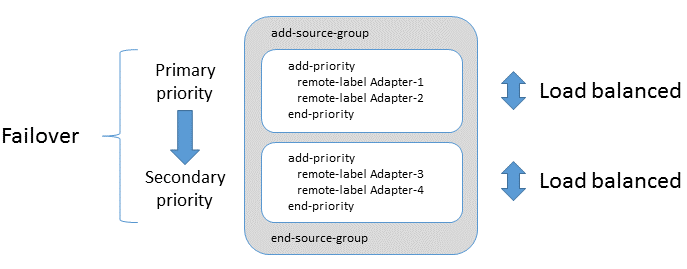
Once again we have two Integration Adapters that supply the same FX data: fxpriceadapter1 and fxpriceadapter2. The fx-prices data service refers to each Adapter from within a distinct priority group and the order of the priority groups determines the failover priority. So when the Liberator starts up, it connects to fxpriceadapter1 (provided this Adapter is up and running), and then all subsequent FX subscription requests are sent to fxpriceadapter1. If fxpriceadapter1 becomes unavailable - it could stop working, or the network connection to it could be lost - the Liberator fails over by connecting to fxpriceadapter2. Liberator sends requests for all its existing subscriptions, and any subsequent subscription requests, to this alternate Adapter.
If you wanted your FX pricing data stream to be extremely resilient, you could have three, or even more, FX Pricing Adapters and configure a separate priority group for each one, so that the Liberator could fail over to each Adapter in turn.
It is possible to include more than one adapter in each add-priority group. Adapters within each add-priority group are load-balanced. If an Adapter fails within an add-priority group, then subscriptions will failover to the remaining Adapters in the group. If all Adapters within an add-priority group fail, then all subscriptions will failover to the Adapters in the next add-priority group.
Failover is a suitable configuration for all data services except those that route subscriptions for trade and blotter channels. Because of relative differences in subscription persistance between trade and blotter subscriptions, an edge case can arise during recovery of a failed Trading Adapter instance when a user’s trade and blotter subscriptions can be routed to different instances of the Trading Adapter. A user’s trade channel subscriptions and blotter channel subscriptions must be routed to the same Trading Adapter instance; see source affinity above.
| Don’t use failover for data services that route updates on trade channels or blotter channels; use load balancing with source affinity instead. |
Using data services in your own DataSource applications
As we have seen above, Liberator makes extensive use of data services, and so does Transformer. You can also configure data services into your own C-based DataSource applications that have been built using the DataSource C API, and into .NET-based DataSource applications built with the DataSource.NET API.
Data services aren’t available in Java-based applications built with the Caplin Integration Suite, but this isn’t really a problem because you normally use the Caplin Integration Suite to implement Integration Adapters that supply data to the Caplin Platform (Liberator or Transformer), rather than subscribing to data themselves.
See also:
-
Reference: Data services configuration
-
Reference: DataSource peers configuration
-
How can I… Load-balance adapters using source affinity