
Migrating a container solution to use List objects
This page describes how to migrate a container solution to a list object solution.
Migration requirements
| At the time of writing, the List data type does not yet have full feature parity with containers. Before considering a migration, refer to Lists > Feature parity with containers. |
Ensure components in your deployment match the specification below:
| Component | Minimum Version |
|---|---|
Liberator |
8.0.5 |
Transformer |
8.0.4 |
Refiner module |
Not supported yet |
| Library | Minimum Version |
|---|---|
StreamLink Android |
8.0.4 |
StreamLink Java |
8.0.4 |
StreamLink JS |
8.0.4 |
StreamLink TS |
8.0.4 |
StreamLink .NET |
8.0.4 |
StreamLink iOS |
Not supported yet |
| Library | Minimum Version |
|---|---|
C DataSource API |
8.0.6 |
Java DataSource API |
8.0.6 |
.NET DataSource API |
Not supported yet |
Migrating StreamLink application code to lists
Follow the steps below:
-
Upgrade the application’s StreamLink library to a version that supports lists (see Migration requirements).
-
Remove any application code that depends on container features not yet implemented for the list data type. See Lists > Feature parity with containers
-
From Liberator 8.0.10, when setting a window size for a StreamLink subscription to a list object (see Subscription.setContainerWindow), set the window size to a value less than the value of Liberator’s
list-object-yield-sizeconfiguration item.
No further changes are required. StreamLink presents the list to the application as a container. Subscribe to the list as you would a container.
Migrating DataSource application code to lists
Follow the steps below:
-
Upgrade the application’s DataSource library to a version that supports lists (see Migration requirements).
-
Remove your namespace handler for container constituent subjects
-
Update your namespace handler for the container subject to publish a
ListMessageobject instead of a container. -
Update your backend-data event handlers to publish a
ListMessageobject containing just the data that has changed in the backend.
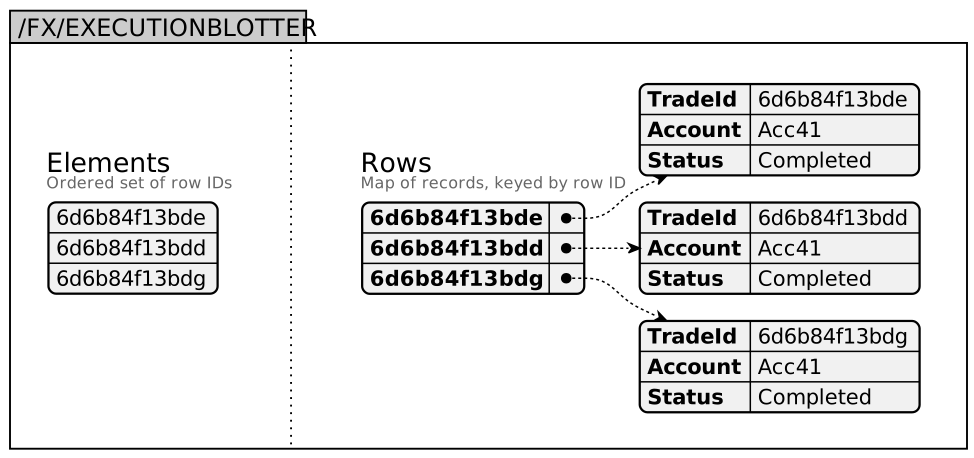
ListMessage objects contain two collections:
-
Elements: an ordered set of row IDs. This collection is a list’s equivalent of a container subject.
-
Rows: a map of records keyed by row ID. This collection is a list’s equivalent of a container’s constituent objects.
You must manage the Elements collection and the Rows collection independently. Adding a row does not automatically add an element. Rows without an element are not presented in the list.
You can add items to the Rows collection in any order, but the order in which you add items to the Elements collection determines the order in which the rows are presented in the list.
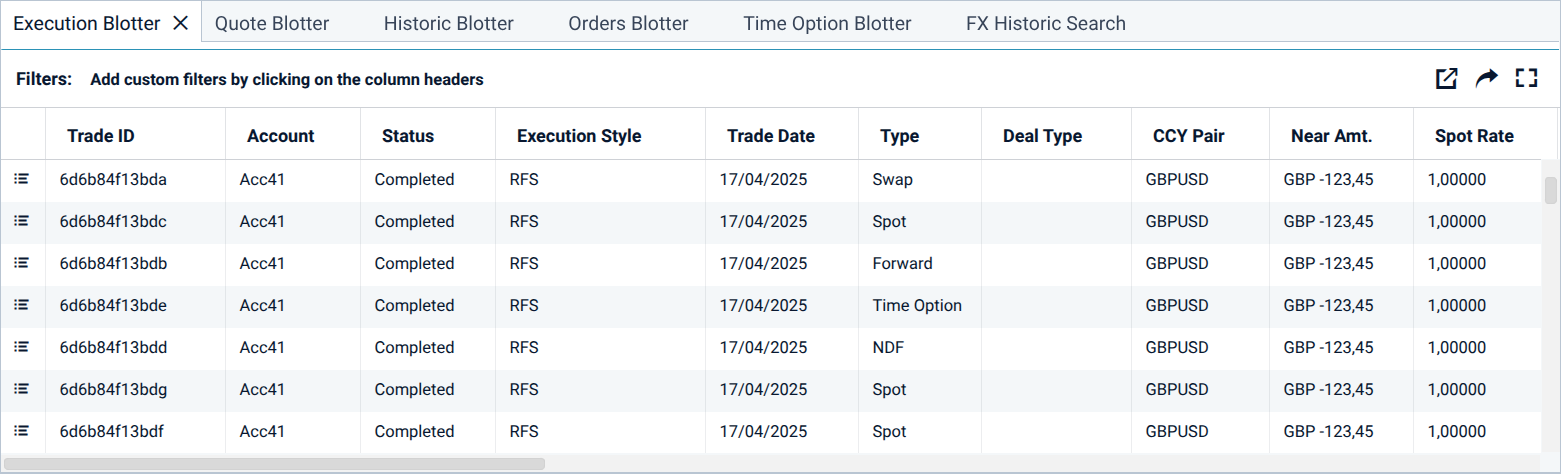
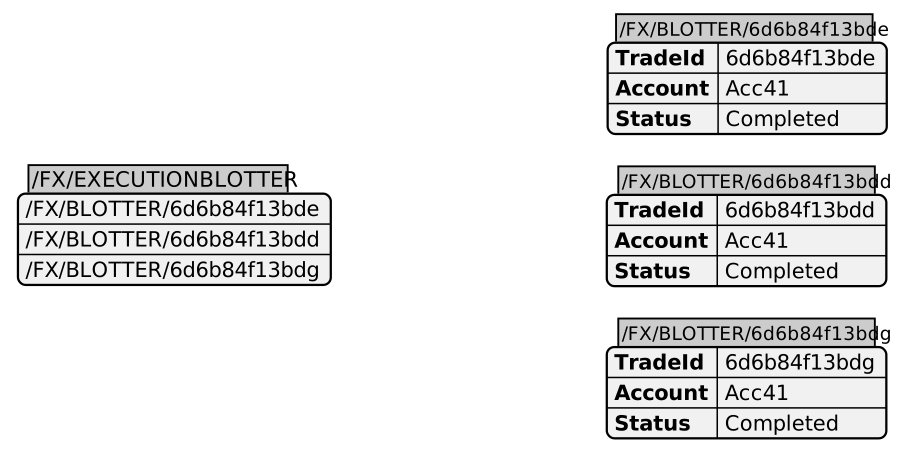
Consider the following blotter:
Container implementation code
For the sake of clarity, this example uses separate namespace handlers for the container constituents. In a real implementation, constituents would be served by a wildcard namespace handler (/FX/BLOTTER/*).
ContainerMessage message = publisher.getMessageFactory().createContainerMessage("/FX/EXECUTIONBLOTTER");
message.addElement("/FX/BLOTTER/6d6b84f13bde");
message.addElement("/FX/BLOTTER/6d6b84f13bdd");
message.addElement("/FX/BLOTTER/6d6b84f13bdg");
publisher.publishInitialMessage(message);GenericMessage message = publisher.getMessageFactory().createGenericMessage("/FX/BLOTTER/6d6b84f13bde");
message.setField("TradeID", "6d6b84f13bde");
message.setField("Acc", "Acc41");
message.setField("Status", "Completed");
publisher.publishInitialMessage(message);GenericMessage message = publisher.getMessageFactory().createGenericMessage("/FX/BLOTTER/6d6b84f13bdd");
message.setField("TradeID", "6d6b84f13bdd");
message.setField("Acc", "Acc41");
message.setField("Status", "Completed");
publisher.publishInitialMessage(message);GenericMessage message = publisher.getMessageFactory().createGenericMessage("/FX/BLOTTER/6d6b84f13bdg");
message.setField("TradeID", "6d6b84f13bdg");
message.setField("Acc", "Acc41");
message.setField("Status", "Completed");
publisher.publishInitialMessage(message);To migrate the blotter’s container implementation to a list, we replace the container’s namespace handler (/FX/EXECUTIONBLOTTER) with a new handler that publishes the following ListMessage object:
ListMessage message = publisher.getMessageFactory().createListMessage("/FX/EXECUTIONBLOTTER");
Map<String, String> fields = null;

message.addElement("6d6b84f13bde");
fields = new HashMap<String, String>();
fields.put("TradeID", "6d6b84f13bde");
fields.put("Acc", "Accc41");
fields.put("Status", "Completed");
message.addRow("6d6b84f13bde", fields, true);

message.addElement("6d6b84f13bdd");
fields = new HashMap<String, String>();
fields.put("TradeID", "6d6b84f13bdd");
fields.put("Acc", "Accc41");
fields.put("Status", "Completed");
message.addRow("6d6b84f13bdd", fields, true);

message.addElement("6d6b84f13bdg");
fields = new HashMap<String, String>();
fields.put("TradeID", "6d6b84f13bdg");
fields.put("Acc", "Accc41");
fields.put("Status", "Completed");
message.addRow("6d6b84f13bdg", fields, true);

publisher.publishInitialMessage(message);
The published list object has the following structure:
See also:
-
DataSource for Java: com.caplin.datasource.messaging.list package