
FX Corporate configuration
This page lists the configuration options for Caplin FX Corporate.
For guidance on where and how to set configuration options, see Configuring FX Corporate.
- APP_ID
- APP.NAME
- BENEFICIARY.DETAILS
- CAPLIN.LOGIN
- CAPLIN.PERMISSION.CONFIG
- CONFIRMATION.EMAIL
- CONFIRMATION.OFFICE
- CONFIRMATION.PHONE
- CONFIRMATION.COMMODITIES.PHONE
- CONFIRMATION.COMMODITIES.EMAIL
- CONFIRMATION.COMMODITIES.PHONE.OPERATIONS
- CONFIRMATION.COMMODITIES.EMAIL.OPERATIONS
- CONFIRMATION.COMMODITIES.OFFICE.OPERATIONS
- CONFIRMATION.TERMS_AND_CONDITIONS.TRADE_TYPE_SPECIFIC
- CONFIRMATIONPDF.ADDRESS
- CONFIRMATIONPDF.LOGO
- CONFIRMATIONPDF.PHONE
- CONFIRMATIONPDF.COMMODITIES.PHONE
- CONFIRMATIONPDF.SHOW_INSTRUCTIONS
- CONFIRMATIONPDF.PAGE_SIZE
- CONFIRMATIONPDF.INSTRUCTIONS_ON_PAGE
- INVOICESPDF.BANK_DETAILS
- CONFIRMATION_TIMESTAMP_TIMEZONE
- COUNTRIES_TO_CURRENCIES.URL
- DASHBOARD_HEADER_BACKGROUND
- DASHBOARD.DEFAULT_LAYOUT
- FEATURE_CONFIRMATIONS_BLOTTER_SUMMARY_ENABLED
- FEATURE_DASHBOARD_ENABLED
- FEATURE_SPLITTING_ENABLED
- FEATURE_SPLITTING_DISABLE_PAY_SIDE
- FEATURE_SPLITTING_DISABLE_RECEIVE_SIDE
- HELP.PANELS
- HELP.PDFLINK
- HISTORIC_SEARCH.ENABLED
- HISTORIC_SEARCH.SUBJECT.FX
- HISTORIC_SEARCH.SUBJECT.COMMODITIES
- GRID.FILTERING.ALLOWED_TYPES
- IBAN_COUNTRIES.URL
- LOOKUP_ONLY_CURRENCIES.URL
- LOGOUT.CLOSE
- LOGOUT.REDIRECT
- NETTING
- SETTLEMENT
- SETTLEMENT_DETAILS_CONFIG
- SSI.URL
- TERMSANDCONDITIONS.EXPIRY.MONTHS
- TERMSANDCONDITIONS.URL
- TERMS_AND_CONDITIONS
- UPLOAD_SETTLEMENT_INSTRUCTIONS_LINK
- UPLOAD_SETTLEMENT_TEMPLATE
- XSRF.COOKIE.ENABLED
- XSRF.COOKIE.NAME
- XSRF.HEADER.NAME
APP_ID
The StreamLink application identifier. The application identifier distinguishes client traffic in StreamLink log files and in Liberator licence monitoring.
Type |
String |
Valid values |
If your Liberator is licensed at the application level, then APP_ID must match an application identifier that your Liberator servers are licensed to accept. |
Default value |
|
APP.NAME
Sets the HTML title of the application page. The HTML title is visible in the title of the browser window or tab.
Type |
String |
Valid values |
|
Default value |
|
BENEFICIARY.DETAILS
Configures the fields used to store details of a settlement instruction’s beneficiary.
Type |
Array of objects |
Valid values |
Each object in the array describes a field. For the object specification, see Beneficiary field description object. |
Default value |
|
| Property | Type | Description |
|---|---|---|
|
String |
Unique ID. (Required) |
|
String |
Text to display in the field when empty. |
|
String |
Field label. (Required) |
|
Boolean |
Set to true if completion of the field is mandatory. |
|
Array of strings |
A list of currencies (three-letter currency codes) for which completion of this field is mandatory. The option |
CAPLIN.LOGIN
The configuration object for the built-in login page.
To customise the login page’s background graphic, company logo, and product logo, see Theme settings: login page artwork.
Type |
JavaScript object |
Valid values |
See specification below |
Default value |
|
| Property | Type | Description |
|---|---|---|
enabled |
Boolean |
Set to true (default) to use the built-in login page. |
forgottenPasswordFunction |
JavaScript function |
Function that handles a password recovery request. See example code below. |
keyMasterUrl |
String |
The URL of the KeyMaster servlet. |
links |
Array of link objects (see table below) |
Text and hyperlinks to display on the login page. |
minimumPasswordStrength |
Integer (0-4) |
The minimum password strength for new passwords. Password strength is measured using the zxcvbn library, which uses a scale of 0-4:
|
redirectURL |
String |
When |
title |
String |
The title to display for the login page. |
usernameFormat |
String or Regex |
The name of a validator or a regular expression. A validator, 'email', is provided out-of-the-box to validate email addresses. |
usernameMessage |
String |
The message displayed when a username format is incorrect. |
| Property | Type | Description |
|---|---|---|
text |
String |
The text to display |
url |
String |
[optional] The URL to navigate to on clicking the text |
export const ForgottenPasswordExample = function(loginData, callback) {
  /**
   * example:
   * loginData = { user: "st1@caplin.com" }
   */
  setTimeout(function() {
    if(callback) {
      callback({
        success: true,
        message: ""
      });
    }
  }, 1000);
};

export default ForgottenPasswordExample;
CAPLIN.PERMISSION.CONFIG
Specifies the names and roles of the permission data sources that supply real-time permissioning data for the current user.
FX Corporate receives permissioning data from a datasource by subscribing to a container with the following subject: /PERMISSIONS/permissioning_source_name/CONTAINER.
Type |
Object |
Valid values |
|
Default value |
|
CONFIRMATION.EMAIL
The support email displayed in the dialog for affirming FX trades and assigning settlement instructions.
Type |
String |
Default value |
'support@caplin.com' |
CONFIRMATION.OFFICE
The support location displayed in the dialog for affirming FX trades and assigning settlement instructions.
Type |
String |
Since |
FX Corporate 3.2.0 |
Default value |
"Sales Desk" |
CONFIRMATION.PHONE
The support phone number displayed in the dialog for affirming FX trades and assigning settlement instructions.
Type |
String |
Default value |
'+44 20 7826 9600' |
CONFIRMATION.COMMODITIES.PHONE
The support phone number displayed in the dialog for affirming Commodities trades and assigning settlement instructions.
Type |
String |
Since |
FX Corporate 3.2.0 |
Default value |
'+44 20 7826 9600' |
CONFIRMATION.COMMODITIES.EMAIL
The support email displayed in the dialog for confirming Commodities trades.
Type |
String |
Since |
FX Corporate 3.2.0 |
Default value |
undefined |
CONFIRMATION.COMMODITIES.PHONE.OPERATIONS
The support phone number displayed in the dialog for confirming Commodities trades.
Type |
String |
Since |
FX Corporate 3.2.0 |
Default value |
undefined |
CONFIRMATION.COMMODITIES.EMAIL.OPERATIONS
The support email displayed in the dialog for confirming Commodities trades.
Type |
String |
Since |
FX Corporate 3.2.0 |
Default value |
undefined |
CONFIRMATION.COMMODITIES.OFFICE.OPERATIONS
The support location displayed in the dialog for confirming Commodities trades.
Type |
String |
Since |
FX Corporate 3.2.0 |
Default value |
undefined |
CONFIRMATION.TERMS_AND_CONDITIONS.TRADE_TYPE_SPECIFIC
When set to true retrieve trade type specific terms and conditions.
Type |
Boolean |
Since |
FX Corporate 3.2.0 |
Default value |
true |
CONFIRMATIONPDF.ADDRESS
The address shown on the confirmation PDF.
Type |
List of strings |
Default value |
|
CONFIRMATIONPDF.LOGO
The path to the image file of the logo shown on the confirmation PDF.
Type |
String |
Default value |
undefined |
CONFIRMATIONPDF.PHONE
The phone number shown on the confirmation PDF for FX.
Type |
String |
Default value |
undefined |
CONFIRMATIONPDF.COMMODITIES.PHONE
The phone number shown on the confirmation PDF for Commodities.
Type |
String |
Since |
FX Corporate 3.2.0 |
Default value |
undefined |
CONFIRMATIONPDF.SHOW_INSTRUCTIONS
The phone number shown on the confirmation PDF for Commodities.
Type |
Boolean |
Since |
FX Corporate 3.2.0 |
Default value |
true |
CONFIRMATIONPDF.PAGE_SIZE
Define the format size of the PDF
Type |
String |
Since |
FX Corporate 3.2.0 |
Default value |
A4 |
CONFIRMATIONPDF.INSTRUCTIONS_ON_PAGE
Define how many instructions are show per page.
Type |
Number |
Since |
FX Corporate 3.2.0 |
Default value |
4 |
INVOICESPDF.BANK_DETAILS
The details shown on the invoices PDF
Type |
List of strings |
Since |
FX Corporate 3.2.0 |
Default value |
|
CONFIRMATION_TIMESTAMP_TIMEZONE
Configure the timezone for confirmation/affirmation and remark timestamps in the Confirmation Ticket and Calendar Widget. When this option is not set, the timestamps display in browser local time.
Type |
String |
Since |
FX Corporate 4.2.0 |
Valid values |
A valid TZ identifier. Example: "America/New_York" |
Default value |
undefined |
COUNTRIES_TO_CURRENCIES.URL
URL to the CountriesToCurrencies.txt file.
The file must be hosted at a publicly accessible location on the same website you use to host FX Corporate’s application code.
Each line of the CountriesToCurrencies.txt file contains the name of a country mapped to a currency code in the following format:
<country name>: <currency code>
United Kingdom: GBP
United States: USD
Uruguay: UYU
Uzbekistan: UZS
When creating an ad-hoc instruction for non-IBAN currencies (see IBAN_COUNTRIES.URL), this mapping is used to pre-populate the beneficiary’s country field based on the currency of the ad-hoc instruction.
Type |
String |
Valid values |
URL to the |
Default value |
'resources/CountriesToCurrencies.txt' |
DASHBOARD_HEADER_BACKGROUND
Allows to define an image to be shown in the header panel background of the dashboard.
Type |
String |
Since |
FX Corporate 3.2.0 |
Default value |
undefined |
DASHBOARD.DEFAULT_LAYOUT
Define the default layout the dashboard is shown with when FEATURE_DASHBOARD_ENABLED is enabled
Type |
JavaScript object |
Since |
FX Corporate 3.2.0 |
Default value |
|
FEATURE_CONFIRMATIONS_BLOTTER_SUMMARY_ENABLED
Shows the summary bar at the top of the confirmations blotter page when enabled.
Type |
Boolean |
Since |
FX Corporate 3.2.0 |
Default value |
true |
FEATURE_DASHBOARD_ENABLED
Set to true to enable the Dashboard in the navigation and set it to the initial page the user sees after login.
Type |
Boolean |
Since |
FX Corporate 3.2.0 |
Default value |
true |
FEATURE_SPLITTING_ENABLED
Set to true to enable splitting settlement instruction on a ticket for trade confirmation. Needs FEATURE_SPLITTING_DISABLE_PAY_SIDE and FEATURE_SPLITTING_DISABLE_RECEIVE_SIDE to enable or disable splitting SIs for each side.
Type |
Boolean |
Since |
FX Corporate 2.0.0 |
Default value |
true |
FEATURE_SPLITTING_DISABLE_PAY_SIDE
Set to true to disable splitting settlement instruction on the pay side only of a ticket for trade confirmation.
Type |
Boolean |
Since |
FX Corporate 2.0.0 |
Default value |
false |
FEATURE_SPLITTING_DISABLE_RECEIVE_SIDE
Set to true to disable splitting settlement instruction on the receive side only of a ticket for trade confirmation.
Type |
Boolean |
Since |
FX Corporate 2.0.0 |
Default value |
true |
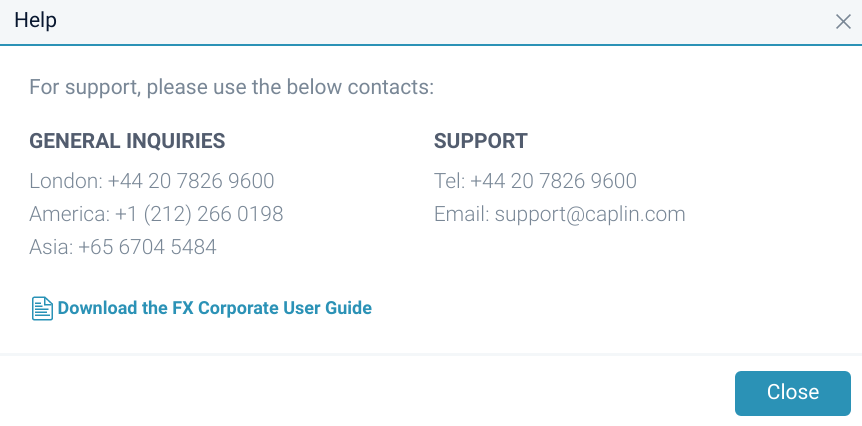
HELP.PANELS
Configures the panels displayed in the Help dialog. The help dialog is displayed when a user clicks the help icon ( ).
There are two panels in the Help dialog. Each panel has a title and a series of key-value pairs.
Type |
Array of objects. Each object represents a panel. Panels are laid out from left-to-right. The first object in the array is the left-most panel. |
Default value |
|
HELP.PDFLINK
The URI to the application user guide file.
The file must be hosted at a publicly accessible location on the same website you use to host FX Corporate’s application code.
Type |
String |
Valid values |
URI to the terms and conditions file. The URI can be an absolute URI or a URI relative to the location of the FX Corporate app. |
Default value |
'resources/UserGuide.pdf' |
HISTORIC_SEARCH.ENABLED
Set to true to enable the Historic Search tab.
Type |
Boolean |
Since |
FX Corporate 3.1.0 |
Default value |
true |
HISTORIC_SEARCH.SUBJECT.FX
Sets the subject used for FX Historic search
Type |
String |
Since |
FX Corporate 3.1.0 |
Default value |
"/PRIVATE/FX/BLOTTER/SEARCH/" |
HISTORIC_SEARCH.SUBJECT.COMMODITIES
Sets the subject used for Commodities Historic search.
Type |
String |
Since |
FX Corporate 3.1.0 |
Default value |
/PRIVATE/COMMODITIES/BLOTTER/SEARCH/ |
GRID.FILTERING.ALLOWED_TYPES
When defined allows to customise blotter filtering for FX and Commodities blotter.
Type |
Define a map with key being FX or CORPORATE and a list of valid trade statuses |
Since |
FX Corporate 3.1.0 |
Default value |
|
IBAN_COUNTRIES.URL
URL of a text file containing a comma-separated list of currencies. When an ad-hoc settlement instruction’s currency is within this list, users can only search for the beneficiary by IBAN (the bank lookup search is hidden).
The file must be hosted at a publicly accessible location on the same website you use to host FX Corporate’s application code.
Type |
String |
Valid values |
URL of the IBAN countries file. The URL can be an absolute URL or a URL relative to the location of the FX Corporate app. |
Default value |
'resources/IBANCountries.txt' |
LOOKUP_ONLY_CURRENCIES.URL
URL of a text file containing a comma-separated list of currencies. When an ad-hoc settlement instruction’s currency is within this list, users can only search for the beneficiary by Bank lookup. (the IBAN search is hidden).
The file must be hosted at a publicly accessible location on the same website you use to host FX Corporate’s application code.
Type |
String |
Valid values |
URL of the Bank lookup countries file. The URL can be an absolute URL or a URL relative to the location of the FX Corporate app. |
Default value |
'resources/LookupOnlyCurrencies.txt' |
LOGOUT.CLOSE
When set to true, the application will attempt to close the browser window or tab when users log out. If the close operation fails, then, if LOGOUT.REDIRECT is set to true, the application will redirect the user to the URL specified in CAPLIN.LOGIN redirectUrl.
Type |
Boolean |
Valid values |
|
Default value |
false |
LOGOUT.REDIRECT
When set to true, then on logging out, users are redirected to the URL specified in CAPLIN.LOGIN redirectUrl.
Type |
Boolean |
Valid values |
|
Default value |
false |
NETTING
Configuration options for the Netting page.
Type |
JavaScript object |
Default value |
|
SETTLEMENT
Configuration options for the Manage Settlement Instructions page.
Type |
JavaScript object |
Default value |
|
| Property | Type | Description |
|---|---|---|
|
Boolean |
If settlement instructions have not been provided during the trading process, automatically suggest the default settlement account for each currency at affirmation. |
|
Array of strings |
Array of field names corresponding to the columns of the table listing settlement instructions pending authorisation by the bank. |
|
Array of strings |
Array of field names corresponding to the columns of the table listing saved settlement instructions. |
|
Array of strings |
Array of field names to display when a row in the pending or the saved table is selected by a user. |
SETTLEMENT_DETAILS_CONFIG
Configures swift payment fields for tag 70 compliance.
The default configuration for SETTLEMENT_DETAILS_CONFIG is defined in the file src/config/settlement-details-config.js and imported into the file src/config/AppConfig.js.
Type |
JavaScript object. Each property of the object holds an array of four field description objects. One property, 'Default', is mandatory, and holds the default settings for swift payment fields. All other property names are currency codes and are optional. {
Default: [
<object>,
<object>,
<object>,
<object>
],
<currency>: [
<object>,
<object>,
<object>,
<object>
],
...
}
For the specification of the objects in the arrays, see Swift payment field description object. |
Default value |
|
| Property | Type | Description |
|---|---|---|
|
String |
Field label. (Required) |
|
Boolean |
Set to true if the user must supply a value for this field. |
|
Integer |
Constrain field values to a specific number of characters. |
|
Integer |
Constrain field values to a minimum number of characters. |
|
Integer |
Constrain field values to a maximum number of characters. |
|
Boolean |
Constrain field values to numeric values only. |
SSI.URL
The URI to the bank’s settlement instructions file.
The file must be hosted at a publicly accessible location on the same website you use to host FX Corporate’s application code.
Type |
String |
Valid values |
URI to the terms and conditions file. The URI can be an absolute URI or a URI relative to the location of the FX Corporate app. |
Default value |
'resources/SSIs.pdf' |
TERMSANDCONDITIONS.EXPIRY.MONTHS
The number of months for which a user’s acceptance of your T&Cs is valid. After a user’s acceptance expires, the user must re-accept your T&Cs at their next login to continue using FX Corporate.
If TERMSANDCONDITIONS.EXPIRY.MONTHS is unset (the default), or set to 0, users' acceptance of T&Cs does not expire.
Regardless of the value of TERMSANDCONDITIONS.EXPIRY.MONTHS, users will be prompted to re-accept your T&Cs if you increment the T&C version number.
The effective expiry date is calculated by adding the specified number of months to the date of the user’s acceptance. If the end month has fewer days than the day-of-month of the user’s acceptance, then the expiry date is set to the final day of the end month. For example, if a user accepts T&Cs on 30 January 2018 and TERMSANDCONDITIONS.EXPIRY.MONTHS is set to 1, then the user’s acceptance expires on 28 February 2018.
Type |
Integer |
Valid values |
Positive integer. 0 disables the feature. |
Default value |
undefined |
TERMSANDCONDITIONS.URL
The URI to the file containing the text for FX Corporate’s terms and conditions of use. The text is rendered in a dialog when users first log in to FX Corporate and on subsequent logins if the version of the terms and conditions has been incremented.
The file must be hosted at a publicly accessible location on the same website you use to host FX Corporate’s application code.
For information on the format of the terms and conditions file, see Terms and conditions.
| Deprecated in favour of TERMS_AND_CONDITIONS (from FX Corporate 3.2.0) |
Type |
String |
Valid values |
URI to the terms and conditions file. The URI can be an absolute URI or a URI relative to the location of the FX Corporate app. |
Default value |
'resources/TermsAndConditions.txt' |
TERMS_AND_CONDITIONS
Define the Terms and Conditions shown for FX(Default) and Commodities and enable if they are shown per user permissions.
Type |
JavaScript object |
Since |
FX Corporate 3.2.0 |
Default value |
|
UPLOAD_SETTLEMENT_INSTRUCTIONS_LINK
The URL of the Settlement Instructions Upload servlet. The URL can be absolute or relative.
Type |
String |
Since |
FX Corporate 2.0.0 |
Default value |
"servlet/ConverterServlet/" |
UPLOAD_SETTLEMENT_TEMPLATE
The template file used for the Settlement Instruction upload
Type |
String |
Since |
FX Corporate 2.0.0 |
Default value |
"static/fsi-template.csv" |
XSRF.COOKIE.ENABLED
Set to true to enable protection against cross-site request forgeries (often abbreviated to XSRF or CSRF).
When enabled, FX Corporate reads a cookie (XSRF.COOKIE.NAME) set by FX Corporate’s web application server. FX Corporate then includes the value of this cookie in an HTTP header (XSRF.HEADER.NAME) with every request to the web application server.
Type |
Boolean |
Default value |
false |
XSRF.COOKIE.NAME
The name of the XSRF cookie. See XSRF.COOKIE.ENABLED.
Type |
String |
Default value |
XSRF-TOKEN |
XSRF.HEADER.NAME
The name of the custom HTTP header used to include the XSRF token with client requests. See XSRF.COOKIE.ENABLED.
Type |
String |
Default value |
X-XSRF-TOKEN |