
Access Refiner through StreamLink
This page describes how to use the StreamLink API to sort and filter a container on the server-side via Transformer’s Refiner module.
Alternatively, for information on how to use StreamLink to sort and filter a container on the client-side, see Sorting and filtering with Client-side Refiner.
StreamLink insulates you from much of Refiner’s subject syntax. For information on how to manually build a request for data via Refiner, see Refiner subject syntax.
Refiner limitations
Avoid filtering or sorting on record fields that are subject to frequent updates. Frequent updates can have an adverse affect on the performance of Caplin Refiner, Liberator, and the requesting clients.
Accessing Refiner through StreamLink JS
You specify filtering, sorting, and grouping criteria in the subscriptionParameters parameter when you subscribe to a subject using the method caplin.streamlink.StreamLink.subscribe(subject, listener, subscriptionParameters).
The subscriptionParameters parameter accepts a JavaScript object with the following properties, all of which are optional. The select property is used to specify filtering, sorting, and grouping criteria:
{
  fields: array,
  filter: {
    value: string,
    image: boolean
  },
  window: {
    start: integer,
    size: boolean
  },
  freeform: string,
  select: {
    where: string,
    orderby: string,
    groupby: string
  }
}
The select property is a JavaScript map with the following properties, all of which are optional:
| Property | Type | Description | ||
|---|---|---|---|---|
|
String |
A Refiner filter expression. StreamLink provides classes that make building a valid expression easier. See the StreamLink JS code example below. Example
bid>1.5 |
||
|
String |
Sort order for records in the container, in the form: 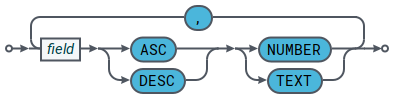
Example
bid DESC NUMBER |
||
|
String |
A field by which to group records in the container. Example
bid |
The StreamLink JS example below subscribes to the subject /PRIVATE/BLOTTER/FX and uses the following classes to build the Refiner filter expression:
// Local references to namespaced StreamLink classes
var ContainerFilterFactory = caplin.streamlink.ContainerFilterFactory;
var FilterExpressionLogicalOperator = caplin.streamlink.FilterExpressionLogicalOperator;
var FilterExpressionOperator = caplin.streamlink.FilterExpressionOperator;

// Build filter expression
var filter = ContainerFilterFactory.createLogical(
  FilterExpressionLogicalOperator.OR,
  ContainerFilterFactory.createLogical(
    FilterExpressionLogicalOperator.AND,
    ContainerFilterFactory.create("bid", FilterExpressionOperator.GREATER_THAN, "100"),
    ContainerFilterFactory.create("bid", FilterExpressionOperator.LESS_THAN, "110")
  ),
  ContainerFilterFactory.createLogical(
    FilterExpressionLogicalOperator.AND,
    ContainerFilterFactory.create("bid", FilterExpressionOperator.GREATER_THAN, "200"),
    ContainerFilterFactory.create("bid", FilterExpressionOperator.LESS_THAN, "220")
  )
);

// Outputs "(bid>100&bid<110)|(bid>200&bid<220)" to the browser console
window.console.log(filter.toFilterString());

// Subscribe to /PRIVATE/BLOTTER/FX
var listener = {
  onRecordUpdate: function(subscription, event) {
    window.console.log(event);
  },
  onSubscriptionError: function(subscription, event) {
    window.console.log(event);
  }
}
var subscriptionParameters = {
  select: {
    where: filter.toFilterString()
  }
}
streamlink.subscribe("/PRIVATE/BLOTTER/FX", listener, subscriptionParameters);
Accessing Refiner through StreamLink Java
The example’s written in Java, using the StreamLink Java API. The filter and sort criteria follow the rules explained in Refiner subject syntax.
The relevant classes are:
You build filter expressions in an instance of FilterExpression that’s returned by ContainerFilterFactor. Use the select() method of ContainerSubscriptionParameters to add in any sorting and grouping criteria, and then subscribe to the container, passing the ContainerSubscriptionParameters in the subscription request. The request is then routed to Refiner.
The example shows how to build the filter expression (FIELD1 > 0.1) & (FIELD3 = "ab") and request that the results be sorted in ascending order of the text field FIELD1
// Get an instance of ContainerSubscriptionParameters
ContainerSubscriptionParameters containerSubscriptionParameters =
  streamLink.createContainerSubscriptionParameters();

// Create the filter expression FIELD1 > 0.1
FilterExpression exp1 =
  ContainerFilterFactory.create("FIELD1", FilterExpressionOperator.GREATER_THAN, "0.1");

// Create the filter expression FIELD3 = "ab"
FilterExpression exp2 =
  ContainerFilterFactory.create("FIELD3", FilterExpressionOperator.EQUAL, "ab");

// Create the combined filter expression (FIELD1 > 0.1) & (FIELD3 = "ab")
FilterExpression exp1Andexp2 =
  ContainerFilterFactory.createLogical(FilterExpressionLogicalOperator.AND, exp1, exp2);

// Convert the filter expression to a string for submission to Refiner.
// Also specify an ascending text sort on the field "FIELD3"
// The results aren't grouped (third argument is null)
containerSubscriptionParameters.select(exp1Andexp2.toFilterString(),
  "FIELD1 ASC TEXT", null);

//Send the subscription request to Liberator, and hence on to Refiner in Transformer
Subscription subscription =
  streamlink.subscribe("/container", subscriptionListener,
    containerSubscriptionParameters);
If you only want to sort and/or group the container contents without filtering them, just specify the filter string argument of containerSubscriptionParameters.select() (the first argument) as null:
containerSubscriptionParameters.select(null, "FIELD1 ASC TEXT", "FIELD4");
Subscription subscription =
  streamlink.subscribe("/container", subscriptionListener,
    containerSubscriptionParameters);
In Refiner 7.0.0 and later, you can sort on multiple fields. In the select() method of ContainerSubscriptionParameters, you supply the sort criteria separated by a comma. Here’s an example where the sort is on the fields FIELD1 (text, ascending order) and FIELD2 (numeric, descending order):
containerSubscriptionParameters.select(null,
  "FIELD1 ASC TEXT,FIELD2 DESC NUMBER", "FIELD4");

Subscription subscription = streamlink.subscribe("/container",
  containerSubscriptionParameters.select(null, "field1 ASC TEXT,field2 DESC NUMBER",
"field1"); subscriptionListener, containerSubscriptionParameters);| The exact way in which your client application should set up filter and sort criteria for Refiner depends on which StreamLink API you are using. For details, consult the API Reference document for your particular client implementation language and operating system platform (StreamLink JS, StreamLink Java, StreamLink iOS, and so on). |
| For information about how Caplin Trader uses Refiner to sort and filter data in grids, see How Can I… Configure sorting and filtering (in Caplin Trader 4 grids). |
See also:
-
Configure sorting and filtering (in Caplin Trader 4 grids)